No Major Changes to Liquid Glass Expected Across iOS 27 and macOS 27
Apple's Liquid Glass Interface: Here to Stay and Evolving Gradually
Apple's groundbreaking Liquid Glass interface, a signature element introduced across iOS 26, macOS Tahoe, and its other most recent software platforms, appears to be a permanent fixture in the company's design language. This innovative visual style marks a significant shift for Apple, setting a new aesthetic standard for its operating systems and devices. For users who have experienced the new look, its blend of transparency, depth, and fluid animations represents a bold step forward, promising an immersive and intuitive interaction with their digital world.
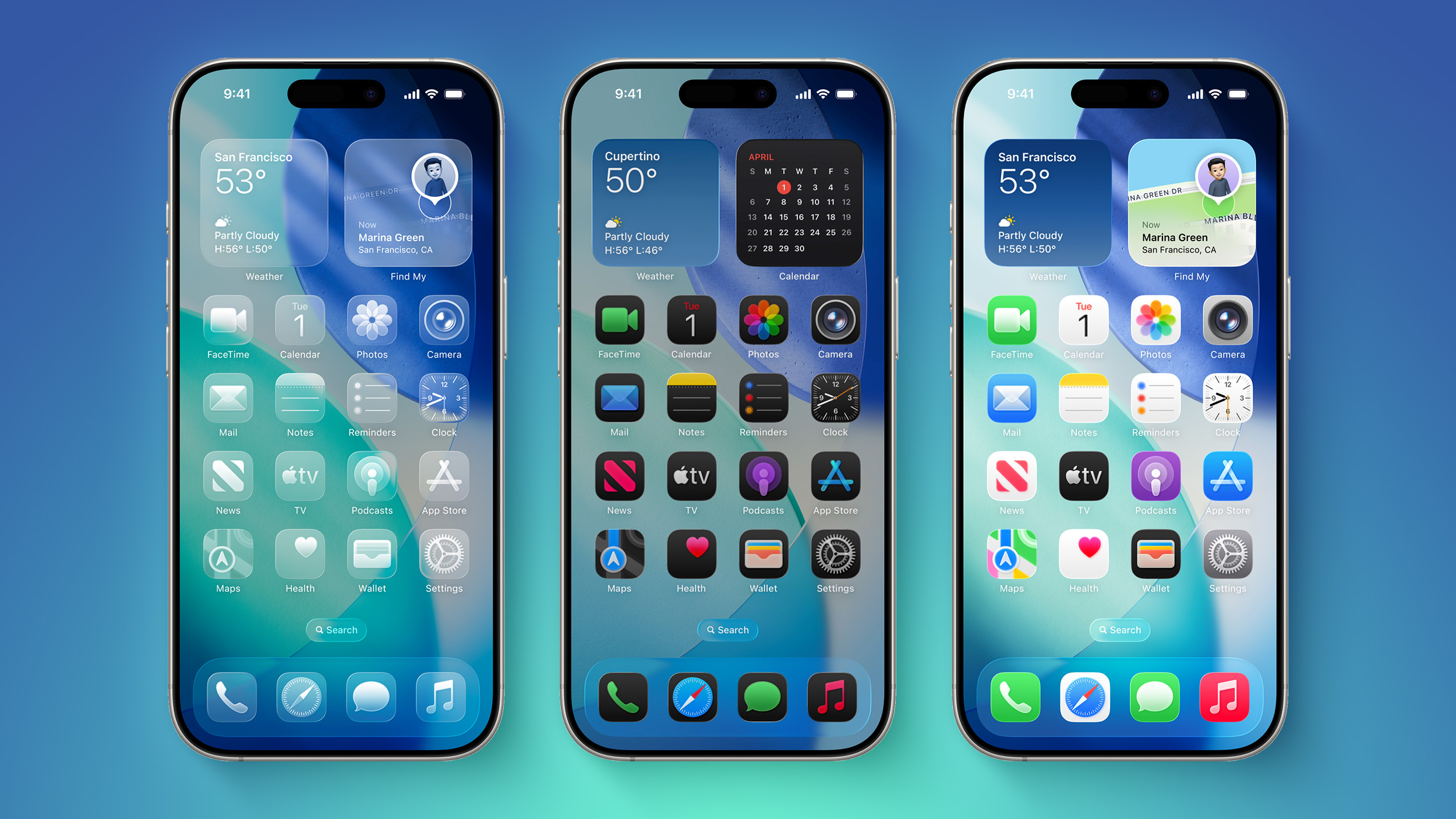
The Future is Clear: No Major Liquid Glass Changes Expected in iOS 27 and macOS 27
According to a recent report from Bloomberg's Mark Gurman in his Power On newsletter, Apple's commitment to Liquid Glass is unwavering. Gurman, a highly respected source for Apple news and insights, revealed that the latest internal versions of the upcoming iOS 27 and macOS 27 operating systems do not feature any significant redesigns or major alterations to the Liquid Glass interface. This news confirms what many industry watchers and users have speculated: Liquid Glass is not a fleeting trend but a foundational shift in how Apple envisions its software interacting with its hardware.
This stability in design suggests a period of refinement rather than revolution for Apple's user interfaces. Instead of large-scale overhauls, the focus will likely be on subtle improvements, performance optimizations, and enhanced user experience within the existing Liquid Glass framework. Such an approach allows Apple to solidify the new aesthetic, gather extensive user feedback, and iteratively perfect the interface, ensuring it meets the high standards of usability and visual appeal that users have come to expect from the Cupertino giant.
Steve Lemay: The Driving Force Behind Liquid Glass
A key factor in the long-term commitment to Liquid Glass is the influence of Apple's new software design chief, Steve Lemay. Gurman specifically highlighted Lemay as "a driving force" behind the Liquid Glass initiative, noting his deep involvement in its development from the very beginning. This revelation underscores the personal investment and vision that a senior leader at Apple has in this particular design direction, lending significant weight to its permanence.
Lemay joined Apple back in 1999, bringing with him decades of experience within the company's design ecosystem. His tenure spans many pivotal eras in Apple's history, giving him a unique understanding of the company's design philosophy and evolution. His ascent to the role of software design chief followed the departure of Alan Dye, who left Apple for Meta at the end of last year. With Lemay at the helm, it is highly probable that Apple will continue to nurture and develop Liquid Glass, guiding its evolution with a steady hand and a clear vision.
His leadership marks a new chapter for Apple's software design. Given his extensive history and profound involvement in Liquid Glass, users can expect a consistent and well-thought-out progression of this interface. This isn't just about maintaining a look; it's about deeply integrating a design philosophy that Lemay himself championed, ensuring that every future iteration enhances the core principles of transparency, depth, and fluidity that define Liquid Glass.
A Gradual Evolution: Learning from the iOS 7 Precedent
The anticipated approach to Liquid Glass's development bears a striking resemblance to how Apple managed the transition and subsequent refinement of iOS 7. When iOS 7 first debuted, it represented a radical departure from the skeuomorphic design language that had defined previous iOS versions. Skeuomorphism, characterized by elements that mimicked real-world objects (like leather stitching in calendar apps or wood grain in bookshelves), was suddenly replaced by a flat, minimalist, and vibrant aesthetic.
The initial reception to iOS 7 was mixed. While many praised its fresh, modern look, some users found it too stark, too flat, or felt that certain elements lacked sufficient visual hierarchy. However, Apple did not abandon this new direction. Instead, under the guidance of its design teams, iOS 7 was gradually refined over successive updates. Incremental changes were introduced, addressing user feedback, improving readability, enhancing animations, and adding subtle details that made the flat design feel more polished and intuitive.
For instance, later versions of iOS 7 and subsequent operating systems like iOS 8 and iOS 9 introduced more depth through blur effects, subtle shadows, and improved spacing, making elements pop without reverting to skeuomorphism. The color palette was also fine-tuned, and accessibility options were enhanced. This gradual, iterative improvement allowed the design to mature, gain wider acceptance, and eventually become the foundation for the visual language that persisted for many years.
It is likely that Apple will adopt a similar strategy with Liquid Glass. Rather than drastic changes that might alienate users or disrupt the established aesthetic, future updates will probably focus on subtle enhancements. This could include further optimization of transparency effects, refinement of animations to feel even more natural, improvements in legibility across various backgrounds, and potentially new ways for applications to leverage the depth and fluidity of the interface. This measured approach ensures that Liquid Glass evolves thoughtfully, growing more robust and user-friendly with each passing update, much like its successful predecessor, iOS 7.
Empowering Users: Existing Customization Options for Liquid Glass
Even in its relatively early stages, Apple has already demonstrated a willingness to provide users with tools to personalize their Liquid Glass experience. This indicates a responsiveness to user preferences and an understanding that while a core design language is essential, individual customization is also highly valued. These initial customization options are crucial for user adoption and satisfaction, allowing a broader range of individuals to tailor the interface to their specific needs and aesthetic tastes.
For example, iOS 26.1 introduced a "Tinted" option. This feature allows users to increase the opacity of Liquid Glass elements across the system. For some, the inherent transparency of Liquid Glass, while visually striking, can sometimes reduce contrast, especially over complex or brightly colored wallpapers. The "Tinted" option provides a solution by making these elements more opaque, thereby improving readability and visual distinction without completely abandoning the Liquid Glass aesthetic. This small but significant addition demonstrates Apple's commitment to balancing modern design with practical usability and accessibility concerns.
Following this, iOS 26.2 brought an additional level of control with a slider specifically for adjusting the opacity of Liquid Glass elements on the Lock Screen's clock. The Lock Screen is one of the most frequently viewed parts of the iOS interface, and the ability to customize its appearance is highly valued. Users can now fine-tune how transparent or opaque the background behind the clock appears, allowing for better visibility of their chosen wallpaper or improved contrast for the time display. This targeted customization for a critical UI element further illustrates Apple's iterative approach to design refinement, addressing specific user interface pain points while maintaining the overall design direction.
These initial customization features are more than just cosmetic tweaks; they are indicators of Apple's philosophy for Liquid Glass. They suggest that while the core design will remain consistent, the company understands the importance of flexibility. By offering these options, Apple empowers users to make Liquid Glass work better for them, ensuring that the interface is not only beautiful but also highly functional and adaptable to diverse visual preferences and accessibility needs. This approach can significantly enhance user satisfaction and foster a deeper connection with the operating system.
The Quest for a System-Wide Slider: Engineering Challenges and Future Possibilities
While Apple has already delivered specific customization options, the journey toward comprehensive user control over Liquid Glass has faced its hurdles. According to Gurman's report, Apple initially aimed to introduce a system-wide Liquid Glass slider with iOS 26. Such a slider would allow users to uniformly adjust the transparency and opacity of Liquid Glass elements across the entire operating system, from notification banners to control centers, dock, and app interfaces.
However, Apple encountered significant engineering challenges when attempting to extend this slider across the entire system. Implementing a system-wide transparency control is far more complex than it might seem. It involves numerous technical considerations that go beyond simple visual adjustments. For instance:
- Performance Impact: Constantly rendering transparent and semi-transparent elements across an entire OS can be graphically intensive, potentially affecting device performance, battery life, and overall fluidity, especially on older hardware.
- Visual Consistency: Ensuring that varying levels of transparency look good and maintain visual harmony across thousands of different app interfaces and system elements is a massive undertaking. A setting that looks great on one screen might make another unreadable or visually jarring.
- Dynamic Backgrounds: The effectiveness of transparency often depends heavily on the background content. A transparent element over a busy photo needs to behave differently than one over a solid color to maintain legibility. A system-wide slider needs to account for this dynamic interplay.
- Accessibility: High levels of transparency can be detrimental to users with certain visual impairments or cognitive differences. Ensuring that a system-wide slider always provides sufficient contrast and readability for all users, regardless of their chosen setting, is a critical accessibility challenge.
- Developer Adoption: While system-level controls are managed by Apple, how third-party apps integrate and respond to these settings also needs consideration to ensure a consistent user experience.
Despite these initial setbacks, Gurman's report offers a glimmer of hope. He noted that Apple could revisit the drawing board and successfully implement a system-wide slider in a future iOS 27 version. This suggests that the desire to offer such comprehensive control remains within Apple, and the engineering teams are likely continuing to explore solutions to overcome the technical hurdles.
If Apple manages to introduce a system-wide Liquid Glass slider, it would be a monumental achievement, significantly enhancing user choice and personalizing the iOS and macOS experience to an unprecedented degree. It would demonstrate Apple's ability to tackle complex design and engineering problems, ultimately delivering a more adaptable and user-centric operating system. Users who find the current level of transparency either too much or not enough would gain complete command over this defining aspect of the Liquid Glass interface, truly making their devices their own.

The Road Ahead: Refinement, Not Revolution, for iOS 27 and macOS 27
The consistent message from internal reports, particularly Gurman's, is that iOS 27 and macOS 27 will prioritize refinement of the existing Liquid Glass interface over any dramatic changes. This strategy aligns with Apple's historical pattern of introducing a bold new design language and then spending several subsequent operating system cycles perfecting it. For users, this means stability and a predictable evolution of their devices' look and feel.
So, what can users expect if not a major overhaul? The refinements could manifest in several ways:
- Performance Enhancements: Expect smoother animations, faster transitions, and improved overall responsiveness, especially when interacting with transparent elements or navigating complex interfaces. Apple is always striving to make its software feel instant and effortless.
- Subtle Visual Tweaks: These might include minor adjustments to blur levels, color accuracy within transparent regions, or the visual weight of text against varied backgrounds. Small changes can often lead to significant improvements in readability and aesthetic appeal.
- Accessibility Improvements: Apple is deeply committed to accessibility. Refinements might focus on ensuring that Liquid Glass remains highly usable for individuals with diverse visual needs, perhaps through enhanced dynamic text sizing, improved high-contrast modes, or better integration with voice-over technologies.
- Developer Tools and Guidelines: Apple might release updated tools and clearer guidelines for developers to better integrate Liquid Glass principles into their third-party applications. This would lead to a more cohesive and visually consistent experience across the entire app ecosystem.
- New System Animations: While the core design remains, Apple could introduce new, subtle animations that leverage the depth and fluidity of Liquid Glass, making interactions feel even more intuitive and delightful.
- Integration with New Features: As new hardware and software features are introduced, Liquid Glass will be seamlessly integrated, ensuring the new functionalities adhere to the established design language.
The absence of major design changes in iOS 27 and macOS 27 doesn't imply a lack of innovation. Instead, it signals a period of maturation for Liquid Glass. It allows Apple's engineers and designers to dive deep into the details, optimize every pixel, and ensure that the interface is not just visually appealing but also robust, performant, and truly enhances the user experience across all supported devices. This approach builds confidence among users that the new design is well-supported and will continue to evolve thoughtfully, rather than being subject to arbitrary changes.
The User Experience of Liquid Glass: A Look at Its Impact
The introduction of Liquid Glass has fundamentally altered the user experience across Apple's platforms. Its defining characteristics—transparency, depth, and fluidity—aim to create a more immersive and intuitive environment. But what does this mean for the everyday user?
Pros of Liquid Glass:
- Immersive Feeling: The transparent elements allow glimpses of the underlying wallpaper or app, creating a sense of depth and making the interface feel less like separate layers and more like a coherent, integrated whole. This can lead to a more engaging user experience.
- Modern Aesthetic: Liquid Glass presents a sleek, contemporary look that aligns with modern design trends. It feels fresh and sophisticated, moving away from older, more solid interface elements.
- Enhanced Context: By allowing background content to subtly show through, Liquid Glass can provide a continuous sense of context. For example, seeing a hint of your current task through a notification banner can keep you grounded in your workflow.
- Fluidity and Responsiveness: The design is often paired with highly polished animations that make opening apps, switching tasks, and interacting with UI elements feel exceptionally smooth and natural.
- Visual Interest: The interplay of light, blur, and color within the transparent elements adds a dynamic visual interest that traditional opaque interfaces might lack.
Cons and Challenges of Liquid Glass:
- Readability Issues: For some users, especially those with certain visual impairments or who prefer high contrast, the transparency can sometimes make text or icons harder to read, particularly over busy or brightly colored backgrounds. This is precisely why customization options like the "Tinted" setting are so important.
- Distraction: While providing context, the visibility of background elements can also be distracting for users who prefer a more focused, uncluttered interface.
- Inconsistency (Initial Stages): In its early days, third-party apps might not fully adopt or correctly implement the Liquid Glass aesthetic, leading to a somewhat inconsistent experience across the system. This will improve over time as developers update their apps.
- Potential for Performance Impact: As discussed with the system-wide slider, rendering complex transparency effects can demand more from a device's GPU, potentially affecting battery life or performance on older models. Apple's optimization efforts are crucial here.
Ultimately, Liquid Glass represents Apple's vision for the future of its user interfaces. Its success hinges not just on its visual appeal but also on how effectively it balances aesthetics with functionality, accessibility, and user preference. The ongoing refinement and the introduction of customization options are key to ensuring that Liquid Glass becomes a beloved and universally usable interface.
This article, "No Major Changes to Liquid Glass Expected Across iOS 27 and macOS 27" first appeared on MacRumors.com
Discuss this article in our forums
from MacRumors
-via DynaSage

Post a Comment