Family Sharing in iOS 26.4 No Longer Forces Adults to Share a Payment Method
Big News for Apple Family Sharing: Adults Can Now Use Their Own Payment Methods!
Get ready for a game-changing update in how Apple's Family Sharing works! With the new iOS 26.4, Apple has introduced a small but incredibly useful change that many users have been wishing for. Now, every adult member of your Family Sharing group can choose to use their own personal payment method for purchases, instead of everyone being forced to share just one.
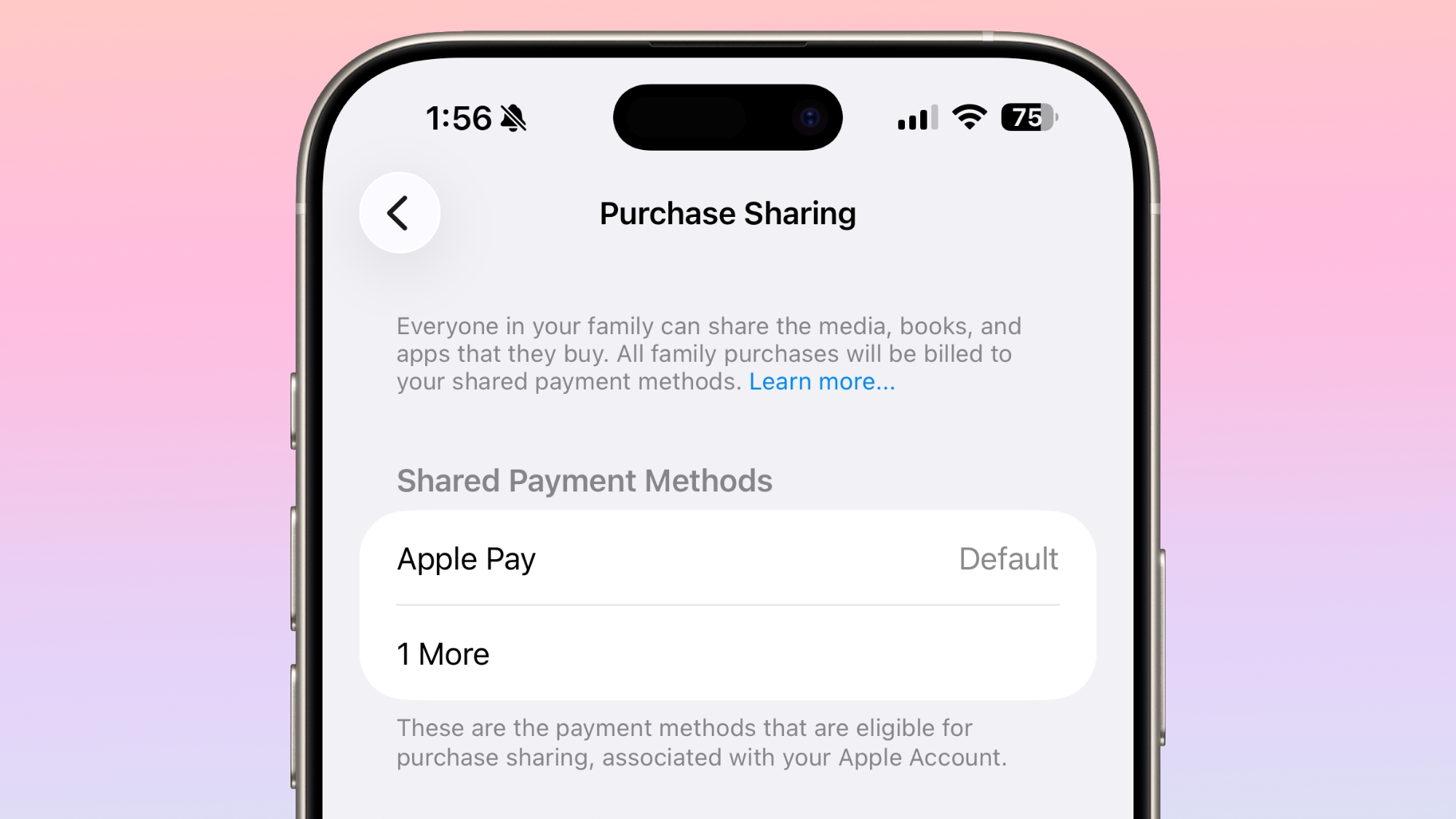
The Old Way: One Payment Method for All
For a long time, Apple's Family Sharing system had a significant rule: if you turned on "Purchase Sharing," everyone in the group had to use a single, shared payment method. This method was always tied to the family organizer's account. This meant that the organizer was automatically responsible for paying for all apps, music, movies, TV shows, and even in-app purchases made by any family member who had Purchase Sharing enabled.
While this system worked well for families with younger children, it often created tricky situations for groups with adult members. Imagine a household where adult siblings or even friends were sharing an Apple Family account to take advantage of shared subscriptions like Apple Music or Apple TV+. If one person bought a new app or rented a movie, the cost would go directly to the organizer's credit card, leading to awkward conversations about who owed what and how to settle up.
This "one size fits all" approach for payment methods presented several challenges:
- Financial Tracking Nightmares: The family organizer had to constantly keep track of purchases made by others, making budgeting complicated and sometimes frustrating.
- Lack of Independence: Adult family members didn't have the freedom to manage their own spending within the Apple ecosystem without directly impacting the organizer's finances.
- Privacy Concerns: All purchases made by any adult in the group would appear on the organizer's billing statement, potentially revealing spending habits that individuals might prefer to keep private.
- Limited Sharing: It made it difficult to extend Family Sharing to friends or extended family members who might benefit from shared subscriptions if it meant the organizer was footing the bill for all their individual purchases.
- Reliance on Apple Account Balance: The only workaround was for each family member to diligently add funds to their Apple Account balance. This meant constantly remembering to top up, which was inconvenient and often forgotten, leading back to the organizer's payment method.
iOS 26.4 Changes Everything: Hello, Individual Payment Methods!
With the arrival of iOS 26.4, Apple is finally addressing these long-standing concerns. The strict rule about a single shared payment method is no more, at least for adult members. This update means that while Family Sharing members can still easily share their digital content and subscriptions, they no longer have to share a payment method.
Apple has explicitly mentioned this important change in its official release notes for iOS 26.4. To make things even clearer, they have also updated their purchase sharing support document, reflecting the new flexibility.
A Look at the New Wording
To help you understand the shift, let's compare the old and new explanations from Apple:
Old Wording:
When the family organizer turns on purchase sharing and other family members in the group also turn on purchase sharing, they get access to each other's shared content, such as apps, music, movies, and more. The family organizer pays for everyone's purchases unless they turn off purchase sharing.
New Wording:
When the family organizer turns on Purchase Sharing and the members enable the feature for their devices, they get access to each other's shared content. The family organizer pays for everyone's purchases unless they turn off Purchase Sharing or other adult family members use their own payment method to make purchases.
The key difference is that last part: "or other adult family members use their own payment method to make purchases." This simple addition opens up a world of convenience and financial independence for adult members within a Family Sharing group.
The Amazing Benefits of This New Feature
This might seem like a small tweak, but its impact is huge, offering numerous advantages for many different types of family groups:
1. Financial Independence and Control
Now, every adult in the Family Sharing group has the power to manage their own spending. They can add their personal credit card, debit card, or other accepted payment methods directly to their Apple ID. This means their individual purchases will be charged to their chosen method, giving them full control and visibility over their own spending without involving the organizer.
2. Eliminating Awkward Conversations and IOUs
No more tracking who bought what and who owes money! This is a massive relief for many families. Whether it's an app for £1.99 or a movie rental for £4.99, the cost goes directly to the person who made the purchase. This fosters smoother relationships and removes a common source of friction within family groups.
3. Enhanced Privacy for Purchases
Before, if your adult child bought a game or subscribed to a service, that purchase would appear on your credit card statement as the family organizer. Now, adult members can make their purchases confidentially, knowing that their spending habits are private and only reflected on their own chosen payment method.
4. Expanded Sharing Possibilities
This update makes it significantly easier to share valuable Apple content and subscriptions with a wider circle of trusted individuals. Want to share your Apple TV+ subscription with a sibling, a close friend, or a roommate? Now you can do so without worrying about having to pay for all their individual App Store purchases. They can join your Family Sharing group to access shared services, but their personal purchases remain their own responsibility.
5. Better Budgeting for Everyone
For the family organizer, this change simplifies budgeting tremendously. They are no longer the default bank for everyone's digital purchases. For adult family members, it encourages more mindful spending as they are directly responsible for their own purchases, helping them stick to their personal budgets.
6. Streamlined Experience – No More Manual Top-Ups
While it was always possible for individual family members to maintain an Apple Account balance (by buying gift cards or adding funds directly) to pay for purchases, this required constant vigilance. Family members had to remember to reload their balance regularly. The option to simply add a separate payment method is much more convenient and eliminates this tedious workaround.
How to Set Up Your Own Payment Method in Family Sharing
While the exact steps might vary slightly depending on your iOS version, the process to add your own payment method as an adult in a Family Sharing group is generally straightforward, similar to how you manage payment methods for your Apple ID:
- Update to iOS 26.4: First and foremost, ensure your iPhone or iPad is updated to iOS 26.4 or later. This feature is only available with this specific version.
- Go to Settings: Open the "Settings" app on your device.
- Tap Your Name (Apple ID): At the very top of the Settings menu, you'll see your name and Apple ID profile picture. Tap on it.
- Select "Payment & Shipping": In your Apple ID settings, find and tap on "Payment & Shipping." You might be asked to authenticate with Face ID, Touch ID, or your passcode.
- Add a New Payment Method: Here, you'll see your current payment methods. Tap "Add Payment Method" (or a similar option) to add a new credit card, debit card, or other payment option. Follow the on-screen instructions to enter your card details and billing information.
- Manage Payment Priority (Optional): Once your personal payment method is added, it will likely become your default for your purchases. However, you can typically reorder or select which payment method is used for your individual purchases if you have multiple options, including the family organizer's method (if you still wish to use it for some purchases).
Important Note: Family Sharing accounts designated for children will continue to use the family organizer's payment method for any purchases. This ensures that parents maintain full control over their children's spending, which is crucial for family management features like "Ask to Buy."
Understanding Apple Family Sharing: A Quick Refresh
This new payment flexibility builds upon the already robust foundation of Apple Family Sharing. Let's briefly recap what Family Sharing is and why it's such a valuable feature for Apple users:
Apple Family Sharing allows up to six family members to easily share purchased apps, music, movies, TV shows, books, and Apple subscriptions with each other without sharing their Apple ID. It also includes other useful features like:
- Shared Content: Access to apps, music, movies, TV shows, and books purchased by other family members.
- Shared Subscriptions: Share access to Apple services like Apple Music, Apple TV+, Apple Arcade, Apple News+, and Apple Fitness+, as well as many third-party subscriptions that support Family Sharing.
- iCloud+ Storage: Share a single iCloud+ storage plan with everyone in the family, so everyone has enough space for photos, videos, and backups.
- Location Sharing: Family members can choose to share their location with each other, making it easy to keep track of loved ones.
- Screen Time: Parents can manage their children's device usage, app limits, and content restrictions.
- Apple Cash Family: For younger family members, parents can set up an Apple Cash account they can use for purchases.
- Find My: Locate lost devices for any family member.
The family organizer is the adult who sets up Family Sharing, invites members, and initially manages the shared payment method. With iOS 26.4, this organizer now has even more flexibility in how finances are managed within the group.
Who Benefits Most from This Update?
This change has positive implications for a wide range of users:
- Adult Siblings or Roommates: Many use Family Sharing to split the cost of services like Apple Music or iCloud+. Now, they can enjoy these shared benefits without mixing their individual spending money. If one sibling buys a new game, it only charges their card.
- Parents of Adult Children: Adult children can remain part of the family group for shared services (like Apple TV+ or the family iCloud+ plan) without relying on their parents for every app purchase. This promotes independence while still leveraging the group benefits.
- Couples: Partners can decide if they want to maintain a truly shared payment method or if each prefers to use their own for individual purchases, offering more choice based on their financial arrangements.
- Friends Who Share Services: If you've been hesitant to create a Family Sharing group with friends to share streaming services because of the payment method issue, this update removes that barrier.
- Blended Families: Offers greater flexibility in managing finances, allowing different adults to contribute and manage their own spending more smoothly within a shared digital environment.
Impact on Subscriptions and Ask to Buy
It's important to clarify how this change interacts with other aspects of Family Sharing:
- Individual Subscriptions: While many Apple services are designed for Family Sharing, individual app subscriptions or in-app purchases made by an adult member will now be charged to their personal payment method. If a family member signs up for a new subscription that isn't sharable, it will come from their chosen payment method.
- "Ask to Buy" for Children: The "Ask to Buy" feature, which allows parents to approve or deny purchases made by children in the Family Sharing group, remains unchanged. Children's accounts will still route all purchase requests through the family organizer's payment method, ensuring parental control and oversight.
- Default for Adults: For adult family members, if they don't set up their own payment method, their purchases will still default to the family organizer's payment method, assuming Purchase Sharing is enabled. The choice is now theirs to make.
Looking Ahead: The Future of Family Sharing
This update in iOS 26.4 is a significant step forward, making Family Sharing more flexible and user-friendly for a diverse range of family dynamics. It shows Apple's commitment to refining its services based on user feedback and evolving needs.
While this change addresses a major pain point, it also opens the door to thinking about what other improvements could come to Family Sharing in the future. Perhaps even more granular controls for shared content, temporary sharing options, or even more flexible roles within the family group beyond just "organizer" and "member."
Don't Miss Out: Update to iOS 26.4!
This highly anticipated feature is set to become available to the public very soon. iOS 26.4 is widely expected to launch next week, so keep an eye out for the update notification on your iPhone or iPad. Once updated, you and your adult family members can immediately start enjoying the newfound financial freedom and convenience that this change brings to Apple Family Sharing.
Say goodbye to payment method headaches and hello to a more harmonious way of sharing your favorite Apple content and services!
This article, "Family Sharing in iOS 26.4 No Longer Forces Adults to Share a Payment Method" first appeared on MacRumors.com
Discuss this article in our forums
from MacRumors
-via DynaSage

Post a Comment