Everything New in iOS 26.4 Beta 4
Apple is always working to improve its operating systems, and a big part of that process involves "beta" testing. Beta versions are like sneak peeks that allow developers and public testers to try out new features and find any issues before the final software is released to everyone. Currently, Apple is well into testing iOS 26, and the latest iteration, iOS 26.4 Beta 4, has just been made available. As the testing cycle progresses, we typically see fewer major new features in each beta, as the focus shifts more towards stability and refinement. However, this particular update brings some exciting additions, notably a fresh collection of emoji characters and a few other significant changes that users will appreciate.
This ongoing beta program is crucial for Apple. It ensures that when iOS 26.4 is officially launched, it's as polished and bug-free as possible, providing the best experience for millions of iPhone and iPad users worldwide. Each beta release, no matter how small the changes might seem, represents another step towards a more robust and feature-rich operating system. For those participating in the beta, it's a chance to influence the final product and get a head start on what's coming next for their devices.
Express Yourself with New Emoji
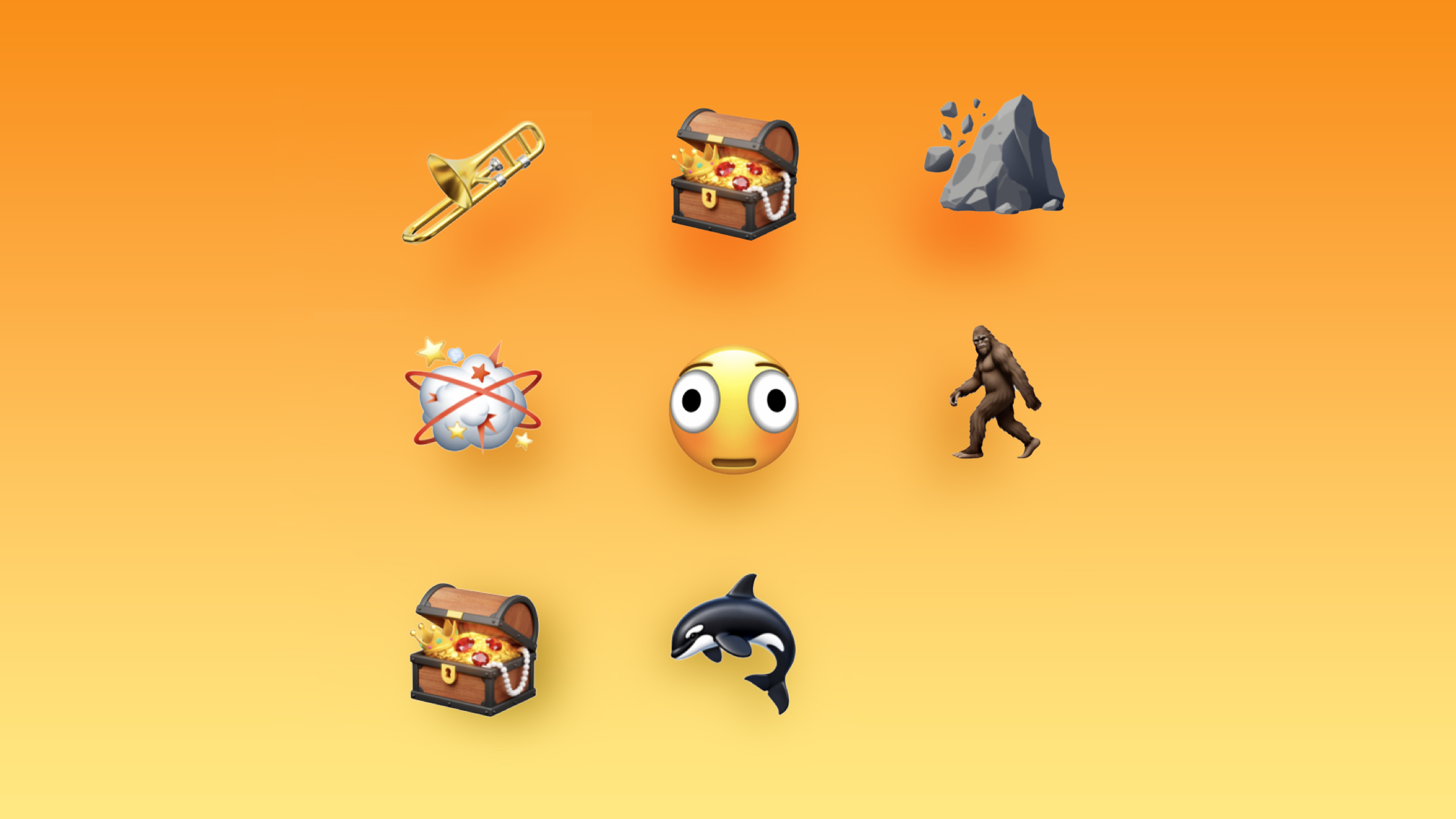
Emojis have become an indispensable part of our digital communication. They allow us to convey emotions, ideas, and even entire narratives in a single, small image, often bridging language barriers and adding a layer of personality to our messages. Apple consistently updates its emoji library to reflect new trends, improve representation, and expand the ways users can express themselves. iOS 26.4 Beta 4 introduces a delightful array of new emoji characters, expanding the visual vocabulary available to iPhone and iPad users.
Among the fresh faces joining the emoji keyboard are a variety of diverse and engaging options. Let's take a closer look at some of these new additions and what they might mean for your daily conversations:
- Trombone: For music lovers, band members, or anyone wanting to express a brassy sound, the trombone emoji is a welcome addition. It can symbolize musical performance, enthusiasm, or even a playful "wah-wah-wah" sound effect in text.
- Treasure Chest: This emoji instantly evokes feelings of discovery, wealth, or hidden gems. Whether you're talking about finding a great deal, uncovering a secret, or simply sharing something precious, the treasure chest provides a clear and exciting visual.
- Distorted Face: This expressive emoji could be used to convey a sense of being overwhelmed, confused, surprised, or even a humorous grimace. Its versatility makes it suitable for a wide range of reactions to unexpected or strange situations.
- Hairy Creature: This mysterious and perhaps adorable addition could represent anything from a beloved pet to a mythical beast, or simply something fluffy and unique. It opens up possibilities for imaginative and quirky communication.
- Fight Cloud: Perfect for conveying cartoon-style conflict, disagreement, or an energetic dispute, the fight cloud (often seen in comics) adds a dynamic visual element to discussions about arguments or competitive situations.
- Orca: Also known as a killer whale, the orca is a majestic marine mammal. This emoji celebrates wildlife and oceans, and can be used to represent power, intelligence, or simply a love for sea creatures and marine life.
- Landslide: This emoji vividly depicts a geological event, which can be used literally to discuss natural disasters or metaphorically to describe overwhelming changes, a sudden collapse of plans, or a massive shift in a situation.
Beyond these standalone characters, Apple is also continuing its commitment to inclusivity and representation within its emoji set. The update includes new skin tone modifiers for the "people wrestling" emoji and the "dancers with bunny ears" emoji. This allows users to better represent themselves and others in these popular social interactions. Furthermore, a gender-neutral option has been introduced for the ballet dancer emoji, providing more choices for how individuals identify and express themselves through these digital icons. These continuous updates ensure that emojis remain a relevant and representative communication tool for a global and diverse user base.
The addition of these new emojis is more than just fun; it's about enriching the emotional and descriptive landscape of digital conversation. Each new emoji offers a fresh nuance, a different way to articulate a feeling or concept that might otherwise require several words. From playfully expressing a mood to concisely illustrating a complex idea, these new icons are set to become mainstays in millions of messages worldwide.
Accessibility Enhanced: Reduce Bright Effects
Apple has long been a leader in creating accessible technology, ensuring that its products can be used and enjoyed by as many people as possible, regardless of their abilities. Accessibility features are not just add-ons; they are fundamental to Apple's design philosophy, aiming to remove barriers and empower users. In iOS 26.4 Beta 4, we see a subtle yet significant improvement to one of these crucial settings.
The accessibility setting previously known as "Reduce Highlighting Effects" has been renamed to "Reduce Bright Effects." This change is more than just cosmetic; it's about clarity and better communication with users. The new name more accurately describes the function of the feature, making it easier for users to understand what it does and whether it might benefit them. Along with the name change, Apple has also provided a clearer explanation of its purpose, stating that the feature "minimizes highlighting and flashing when interacting with onscreen elements, such as buttons or the keyboard."
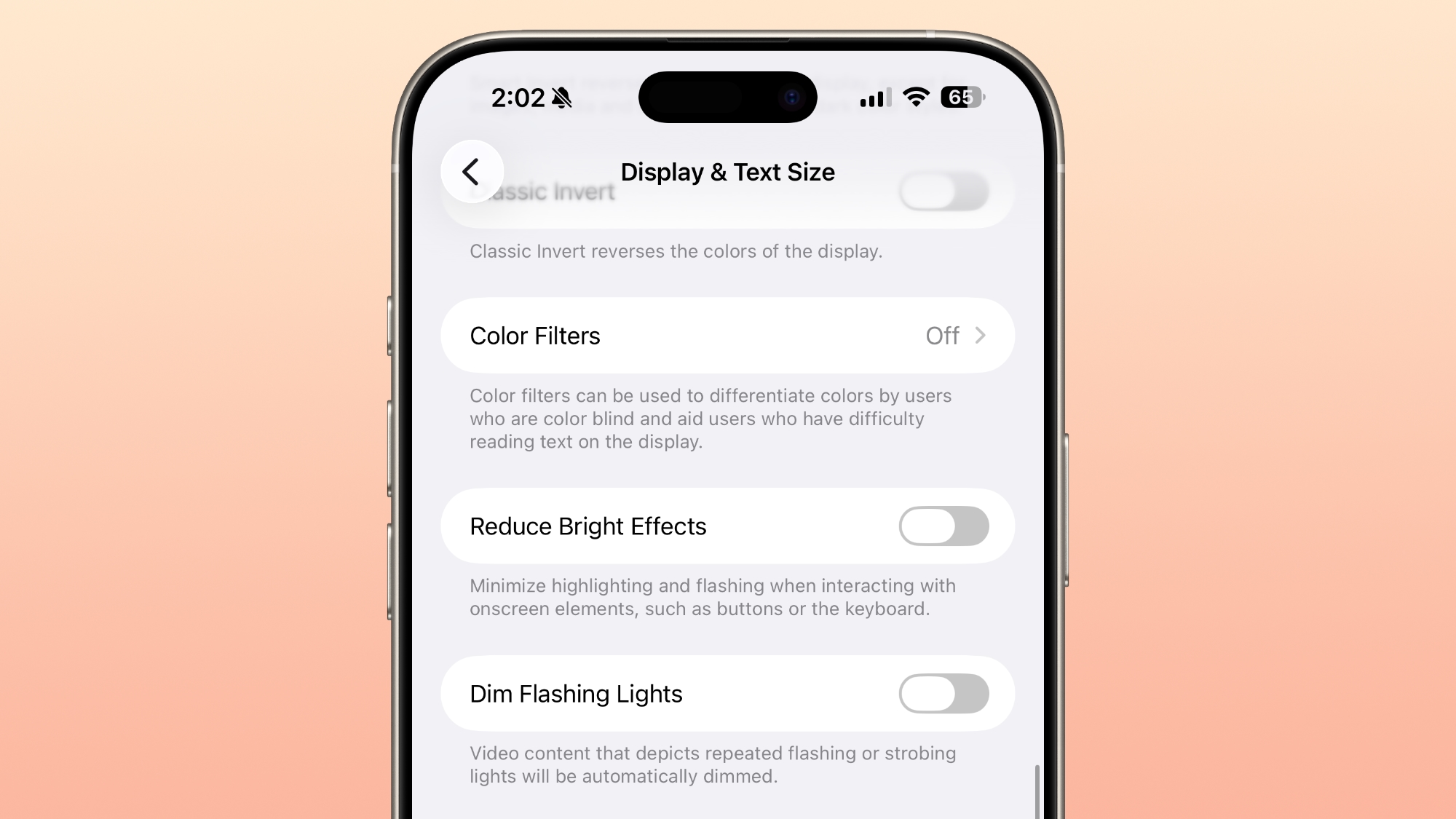
So, what does "minimizing highlighting and flashing" actually mean, and who benefits from it? Many digital interfaces use visual cues like flashes, quick highlights, or rapid changes in brightness to indicate user interaction. For instance, when you tap a button, it might briefly light up or change color. While these effects are generally subtle and enhance the user experience for most, they can be problematic for certain individuals.
Users who might benefit from "Reduce Bright Effects" include:
- Individuals with Photosensitivity: For some people, particularly those with conditions like epilepsy, rapid flashing lights or sudden bright visual changes can trigger seizures or discomfort. This feature helps to reduce such triggers.
- People with Cognitive Sensitivities: Some users might find rapid visual feedback distracting, overwhelming, or even disorienting, impacting their ability to focus and interact effectively with the device.
- Users with Visual Impairments: While not directly related to contrast, reducing overly bright or rapid visual cues can sometimes make the overall interface less fatiguing or easier to process for individuals with certain visual challenges.
- Anyone Seeking a Calmer Interface: Even without specific conditions, some users simply prefer a less visually dynamic and more subdued interface, which this setting can help provide.
By renaming this feature to "Reduce Bright Effects" and offering a clear explanation, Apple makes it more discoverable and understandable for those who need it most. It underscores Apple's ongoing commitment to building technology that is inclusive and adaptable to a wide spectrum of human needs. These thoughtful adjustments to accessibility settings are a testament to how small changes can make a significant difference in how people interact with their devices, enhancing comfort, safety, and usability for everyone.
The Future of Messaging: RCS Encrypted Messaging
One of the most talked-about developments in modern mobile messaging is the evolution of text messages beyond the old SMS/MMS standards. For years, the digital divide between iPhone and Android users has been symbolized by the infamous "green bubble" versus "blue bubble" dichotomy. While iMessage provides a rich, secure, and feature-filled experience for iPhone-to-iPhone communication, messages sent from an iPhone to an Android device (the green bubbles) revert to the outdated SMS/MMS protocol, leading to a poorer experience with low-quality media, no read receipts, and, crucially, a lack of modern security features like end-to-end encryption.
Enter RCS (Rich Communication Services). RCS is a modern messaging protocol designed to replace SMS/MMS, bringing many of the features we expect from apps like iMessage, WhatsApp, or Telegram to standard text messaging, regardless of whether you're on an iPhone or Android. This includes higher-quality photos and videos, audio messages, typing indicators, read receipts, and more reliable group chats.
Apple's Journey to RCS
For a long time, Apple resisted adopting RCS. However, after increasing pressure from Google (which has heavily pushed RCS for Android) and, significantly, potential regulatory actions in regions like the European Union which aim to ensure interoperability and fairness in major communication platforms, Apple announced its intention to support RCS in 2024. This was a major turning point, promising to bridge the messaging gap between the two major mobile ecosystems.
The most important aspect of Apple's announced RCS adoption, and a key focus of recent iOS betas, is end-to-end encryption (E2EE). End-to-end encryption is a method of secure communication that prevents third parties from accessing data while it's transferred from one end system or device to another. In simpler terms, it means only the sender and intended recipient can read the messages. Not even the service provider (like Apple or Google) can see the content. This is the gold standard for privacy and security in digital communication.
Currently, iMessage communications are already end-to-end encrypted when sent between two iPhones. This provides a high level of privacy and security that iPhone users have come to expect. However, when an iPhone user sends a message to an Android user, it falls back to SMS/MMS, which lacks this crucial encryption. This means those "green bubble" conversations are much less secure and private.
RCS Encryption in iOS 26.4 Beta 4: A Temporary Pause
In the earlier betas of iOS 26.4, Apple began testing end-to-end encryption for RCS messages. This was a significant step, as it meant that, for the first time, iPhone-to-Android text message conversations could potentially achieve the same level of encryption and privacy as iPhone-to-iPhone iMessage conversations. Developers and testers were keenly observing this feature, understanding its immense implications for cross-platform messaging.
However, in iOS 26.4 Beta 4, Apple has removed the RCS end-to-end encryption beta. This might sound like a setback, but it's not a cancellation of the feature. Apple had already stated that end-to-end encryption for RCS would not be fully launched in the iOS 26.4 update. Instead, it is planned for introduction in a future iOS update. The removal from Beta 4 simply means that the testing of this specific, crucial encryption component is paused or being re-evaluated for a later, more comprehensive implementation. Developing robust end-to-end encryption for a new messaging protocol and integrating it seamlessly across platforms is a complex technical challenge, and it's not uncommon for features to appear and disappear in beta cycles as developers refine them.
The Impact of Future RCS Encryption
When full implementation of RCS encryption arrives in a future iOS update, it will mark a monumental shift in mobile communication. It will mean that iPhone-to-Android text message conversations will finally have the same level of privacy and security that iPhone users currently enjoy within iMessage. This is a huge win for user privacy and will significantly improve the overall messaging experience for everyone involved in cross-platform chats.
Users can look forward to:
- Enhanced Privacy: Their messages to Android users will be protected from eavesdropping.
- Improved Security: Reduced risk of message interception or tampering.
- Richer Communication: Even without the encryption being active, the general adoption of RCS will bring features like high-quality media sharing, read receipts, and better group chats to iPhone-Android conversations.
- A More Unified Messaging Experience: While iMessage will likely retain its unique features and branding for iPhone-to-iPhone communication, the adoption of RCS will significantly reduce the feature disparity for cross-platform messages, making the "green bubble" experience much closer to the "blue bubble" experience in terms of functionality and security.
While the temporary removal of RCS encryption from iOS 26.4 Beta 4 might cause a brief pause in anticipation, the commitment from Apple to bring this vital feature to its users remains clear. It signifies a future where secure, rich messaging is the standard, regardless of the smartphone brand. This development is not just about technology; it's about improving communication, fostering privacy, and bridging divides in the digital world.
Embracing the Future: New Device Support
One of the exciting aspects of beta software releases is that they often hint at Apple's future hardware plans. iOS 26.4 and iPadOS 26.4 Beta 4 are particularly notable in this regard, as they are the first beta versions that can be installed on upcoming devices: the new iPhone 17e and the M4 iPad Air. This inclusion is a critical step in preparing the software ecosystem for these future products.
What New Device Support Means
When beta software adds support for unreleased hardware, it signals that these devices are far enough along in their development that Apple wants developers to start testing their applications on them. This ensures that when the iPhone 17e and M4 iPad Air are officially launched, apps will run smoothly, take full advantage of new hardware capabilities, and offer an optimized user experience. For developers, this means they can get their hands on the latest SDKs (Software Development Kits) and simulate or directly test their apps on the new hardware configurations.
The iPhone 17e: A Glimpse into the Future
The mention of an "iPhone 17e" is intriguing. While the "e" suffix isn't something Apple has historically used for iPhones in the same way it has for Mac models (like the "iBook G4 eMac"), it suggests a potential new variant or perhaps a special edition within the iPhone 17 lineup. In Apple's typical naming conventions, "e" could historically imply 'enhanced' or an entry-level professional device. Given this is still a future product, it could indicate a new direction for Apple's smartphone strategy, possibly focusing on unique features, a specific market segment, or an enhanced core experience over a Pro model. Supporting this device in a beta allows Apple to gather crucial data on software performance and compatibility long before its public unveiling, ensuring a seamless launch.
The M4 iPad Air: Powering the Mid-Range Tablet
Perhaps even more significant is the support for the M4 iPad Air. Apple's M-series chips have revolutionized its Mac and iPad Pro lineups, bringing desktop-class performance to portable devices. The M4 chip, being the latest iteration, promises even greater speeds, enhanced graphics capabilities, and more efficient power consumption. Bringing an M4 chip to the iPad Air—a device typically positioned as a high-performance mid-range tablet—is a massive upgrade. It suggests that Apple is committed to bringing top-tier performance to a broader audience, blurring the lines between the Air and Pro models even further.
For users, an M4 iPad Air would mean:
- Blazing-Fast Performance: Handling demanding apps, professional workflows, and graphic-intensive games with ease.
- Advanced AI Capabilities: The M4 chip features a powerful Neural Engine, which will unlock new AI and machine learning features within apps and the operating system itself.
- Longer Battery Life: Apple's M-series chips are renowned for their power efficiency, which translates to extended usage times.
- Future-Proofing: An M4 chip ensures the iPad Air can keep up with evolving software demands and new features for many years to come.
The inclusion of these devices in iOS 26.4 and iPadOS 26.4 Beta 4 highlights Apple's methodical approach to integrating hardware and software. It reassures developers that they will have the necessary tools and time to optimize their creations, and it excites users with the prospect of powerful new devices that are ready to run the latest and greatest software from day one.
Dive Deeper: Your Feature Guide
While iOS 26.4 Beta 4 brings some interesting changes, it's just one part of the larger iOS 26.4 development cycle. Each previous beta version introduced its own set of features, improvements, and bug fixes. For those eager to get a comprehensive overview of everything Apple has been testing in this ongoing release, a detailed resource is available. You can find a complete list of all features discovered in prior betas in our dedicated iOS 26.4 feature guide. This guide is regularly updated as new betas are released and new discoveries are made, serving as your go-to resource for tracking the evolution of iOS 26.4.
Beta testing is a dynamic process, and features can be added, modified, or even temporarily removed as Apple refines the software. This guide helps you stay informed about the full scope of changes, from minor UI tweaks to significant functional additions, ensuring you don't miss any of the ongoing developments that will eventually make their way into the public release.
Conclusion: What iOS 26.4 Beta 4 Means for You
iOS 26.4 Beta 4, while appearing late in the beta cycle, delivers a meaningful set of updates that touch upon expression, accessibility, and the future of mobile communication and hardware support. From expanding our digital vocabulary with new emojis to making the interface more comfortable for sensitive users, and laying the groundwork for more secure messaging across platforms, this beta underscores Apple's continuous commitment to refining the user experience.
The addition of new emoji characters like the trombone, treasure chest, distorted face, hairy creature, fight cloud, orca, and landslide, along with improved skin tone and gender-neutral options, ensures that our digital conversations can be more nuanced, inclusive, and fun. These small visual tools play a huge role in how we connect and convey meaning in our increasingly visual world.
The change from "Reduce Highlighting Effects" to "Reduce Bright Effects" with a clearer explanation demonstrates Apple's dedication to accessibility. By making features more understandable and effective for individuals sensitive to visual stimuli, Apple ensures its technology remains welcoming and usable for a broader audience, reinforcing its long-standing leadership in accessible design.
Perhaps the most forward-looking development, despite its temporary removal from this specific beta, is the ongoing work with RCS encrypted messaging. While end-to-end encryption for iPhone-to-Android messages won't arrive with the final iOS 26.4, Apple's commitment to bringing this vital security feature in a future update is a game-changer. It promises to bridge a significant gap in mobile communication, bringing much-needed privacy and a richer experience to cross-platform texting, making those "green bubbles" more secure than ever before.
Finally, the inclusion of support for the hypothetical iPhone 17e and the powerful M4 iPad Air in this beta gives us an exciting peek into Apple's future hardware innovations. It signifies that new, more powerful devices are on the horizon, and Apple is meticulously preparing its software ecosystem to ensure they launch with optimal performance and seamless integration.
As Apple continues to test iOS 26.4, each beta release brings us closer to a final version that promises to be more expressive, more accessible, more secure, and ready for the next generation of Apple devices. The development journey is a complex one, but the ongoing refinements show that Apple is listening to its users and pushing the boundaries of what's possible in mobile technology. Keep an eye out for the final release, which will undoubtedly bring these and other improvements to all compatible iPhones and iPads.
This article, "Everything New in iOS 26.4 Beta 4" first appeared on MacRumors.com
Discuss this article in our forums
from MacRumors
-via DynaSage

Post a Comment