Opera One R3 Gains Music-Reactive UI Theme and 4-Way Split Screen
Opera One R3: Unleash Your Productivity and Personal Style with a Smarter Browser
Get ready to rethink how you browse the internet. Opera has just rolled out a major update to its flagship browser, Opera One R3, packed with groundbreaking features designed to make your online life easier, more productive, and incredibly personalized. This isn't just another incremental update; it's a significant leap forward, introducing a completely rebuilt AI engine, expanded multitasking capabilities, and a dynamic user interface that reacts to your music. From smarter AI assistance to a split-screen experience like never before, Opera One R3 is set to transform your digital workspace.
A New Era of AI in Your Browser: Faster, Smarter, More Aware
Artificial Intelligence is no longer a futuristic concept; it's an integral part of our daily digital interactions. With Opera One R3, Opera is bringing an unprecedented level of AI integration directly into your browser, making your online research, learning, and content consumption remarkably more efficient. The core of this transformation lies in a completely rebuilt AI engine, a testament to Opera's commitment to innovation and user-centric design.
The Rebuilt AI Engine: Smarter and Faster Than Ever Before
At the heart of Opera One R3's AI advancements is an engine re-engineered from the ground up. This powerful new architecture isn't just about adding AI features; it's about fundamentally improving how the browser understands and responds to your needs. The new AI engine borrows its foundational architecture from Opera's experimental Neon browser, a platform known for pushing the boundaries of what a browser can do. This strategic decision means that the AI within Opera One R3 isn't just functional; it's optimized for speed and efficiency. Users will immediately notice a significant boost in performance, with the company proudly stating that the AI now delivers responses a remarkable 20% faster than before. Imagine asking your AI assistant a question and getting an immediate, insightful answer without any noticeable delay – that's the experience Opera One R3 aims to provide. This speed isn't merely a convenience; it's a critical factor in seamlessly integrating AI into your workflow, making it feel less like a separate tool and more like an extension of your own thoughts.
Contextual AI: Your Personal Assistant Knows What You're Doing
One of the most revolutionary aspects of the new AI engine is its newfound ability to operate within the specific context of your browsing. Previously, AI assistants might have struggled to differentiate between multiple ongoing tasks, potentially mixing up information from various tabs or projects. Opera One R3 solves this challenge elegantly. The AI can now understand and respond based on the specific tab or even a group of tabs you are currently focused on. This means if you're researching ancient history in one tab group and planning a vacation in another, your AI assistant will inherently know which context you're referring to when you ask a question. This intelligent contextual awareness prevents information overload and ensures that the AI provides relevant, accurate assistance tailored precisely to your current task. It's like having a highly skilled personal assistant who anticipates your needs and keeps track of your different projects, ensuring that your digital workspace remains organized and your focus uninterrupted. No more sifting through irrelevant information; the AI is truly in sync with your active browsing session.
Revolutionizing Video Consumption with YouTube Integration
Beyond general contextual awareness, Opera One R3 introduces a game-changing integration with YouTube, the world's most popular video platform. This innovative feature leverages the new AI engine to fundamentally change how you interact with video content. Instead of passively watching or painstakingly scrubbing through long videos, the AI can now actively analyze YouTube videos to help you find specific moments or summarize entire segments. Picture this: you're watching a lengthy documentary, and you need to quickly locate the part where a specific historical event is discussed. Simply ask the AI, and it can pinpoint that exact moment for you. Or perhaps you're pressed for time and need a quick overview of a long lecture or product review. The AI can generate a concise summary of the video's content, saving you precious time and ensuring you grasp the key takeaways without watching the entire duration. This intelligent video analysis is a massive boon for students, researchers, journalists, or anyone who frequently consumes educational or informational video content, transforming a traditionally time-consuming activity into an efficient and insightful experience.
Master Your Workflow with Enhanced Multitasking
In today's fast-paced digital world, efficient multitasking is not just a luxury; it's a necessity. Whether you're a student juggling research papers, a professional managing multiple projects, or a casual user simply trying to keep up with various interests, the ability to work with several applications or web pages simultaneously is crucial. Opera One R3 takes this concept to the next level, offering unparalleled multitasking features that allow you to customize your digital workspace for maximum productivity and convenience. Gone are the days of constant tab switching and window juggling; Opera is putting the power of a streamlined workflow directly into your hands.
Four-Way Split Screen: The Ultimate Productivity Playground
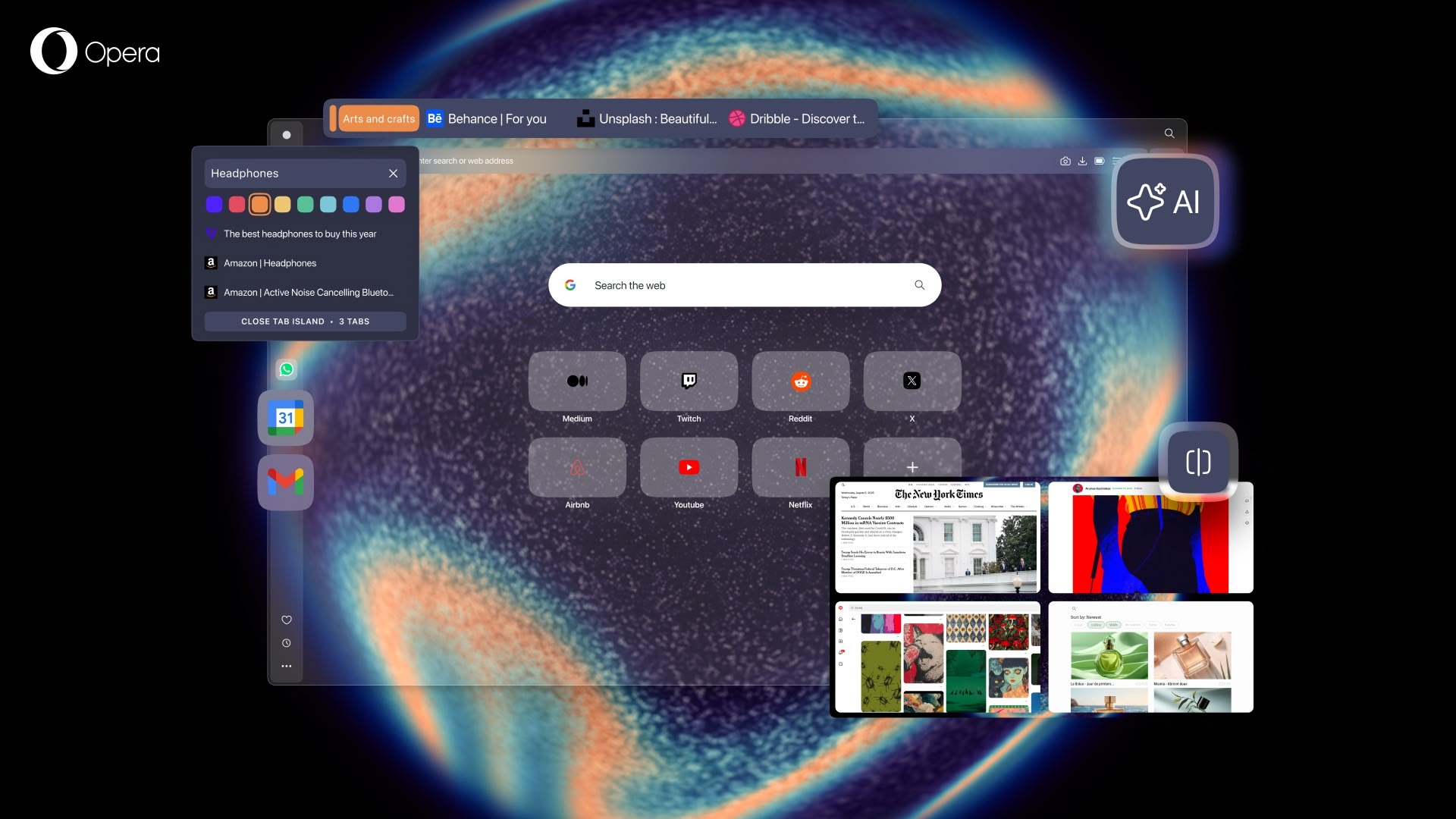
One of the most exciting and impactful additions in Opera One R3 is the significant expansion of its split-screen mode. Building upon the success of its existing two-tab split view, Opera has now pushed the boundaries, allowing users to display up to four tabs simultaneously on their screen. This isn't just a simple doubling of functionality; it's a fundamental reimagining of what a browser workspace can be. For users with larger displays – a common setup in modern computing environments – this feature unlocks unprecedented levels of productivity. Imagine a scenario where you are conducting extensive research: you can have your primary article open in one quadrant, a note-taking application or document in another, a relevant image gallery or video playing in a third, and a quick reference guide or dictionary in the fourth. The possibilities are endless. Opera One R3 offers flexible horizontal and grid layout options, allowing you to arrange your four active tabs in a way that best suits your current task. This dynamic flexibility ensures that you can optimize your screen real estate for any scenario, from content creation and data comparison to live event monitoring and multi-source learning. This four-way split screen transforms your browser into a true command center, eliminating the need to constantly switch between different applications or windows, thereby minimizing distractions and maximizing your focus.
Tab Islands: Keeping Your Digital Workspace Organized and Clutter-Free
Even with advanced split-screen capabilities, managing a multitude of open tabs can quickly become overwhelming. This is where Opera's innovative "Tab Islands" feature continues to shine, and with Opera One R3, it's getting even better. Tab Islands automatically group related tabs together, making it incredibly easy to navigate complex browsing sessions. For instance, if you're planning a trip, all your flight searches, hotel bookings, and tourist attraction pages will naturally group into one "island." Similarly, all research papers for a project could form another. The magic lies in its automation, but Opera One R3 empowers you with even more control. You can now color-code these Tab Islands, adding a visual cue that helps you instantly identify different projects or themes at a glance. Furthermore, the ability to name each Tab Island brings a new level of organization. Instead of a generic "Travel" island, you can name it "European Adventure 2026," making it effortlessly clear what content is contained within. This combination of automatic grouping, visual customization, and personalized naming transforms your tab bar from a chaotic mess into a beautifully organized, easily navigable dashboard, allowing you to effortlessly switch between distinct tasks and projects without losing your place or feeling overwhelmed by a sea of open tabs.
Your Browser, Your Style: Dynamic Personalization and Seamless Integration
A browser is more than just a tool for accessing the internet; for many, it's a digital home, a personalized space where work, entertainment, and communication converge. Opera One R3 understands this deeply, pushing the boundaries of personalization and integration to deliver an experience that truly reflects your style and streamlines your daily digital life. This update introduces dynamic themes that react to your environment and seamlessly brings your most essential apps directly into your browsing experience, ensuring that your browser is not just functional, but also uniquely yours.
Music-Reactive UI Themes: A Symphony for Your Senses
Prepare for a truly immersive browsing experience with Opera One R3's brand-new animated themes. Moving beyond static backgrounds, Opera is introducing themes that dynamically react to your environment, turning your browser into an extension of your mood and activities. The standout feature in this category is a groundbreaking theme developed in collaboration with Spotify. This innovative theme responds directly to the music playing in Opera's built-in player. Imagine your browser's interface subtly shifting colors, displaying gentle animations, or pulsating in sync with the rhythm of your favorite songs. It transforms the act of browsing into a sensory experience, creating a harmonious blend of sight and sound. Whether you're listening to a calming jazz tune or an energetic rock anthem, your browser's aesthetics will adapt, making your online activities feel more vibrant and engaging. This isn't just a visual gimmick; it's an enhancement that makes your browsing experience more personal and enjoyable, merging your entertainment and productivity environments seamlessly. In addition to this pioneering Spotify-integrated theme, Opera One R3 also introduces two other captivating animated themes, offering even more options for users to personalize their browser's look and feel, ensuring there's a dynamic visual style for every taste and preference.
The Power-Packed Sidebar: Everything You Need, Instantly Accessible
The sidebar in Opera has long been a beloved feature, providing quick access to messaging apps, music services, and other essential tools without interrupting your main browsing window. With Opera One R3, this convenience reaches new heights thanks to expanded integration with critical productivity services. The sidebar has now gained native support for Gmail and Google Calendar, two of the most widely used platforms for communication and scheduling. This means you can check your latest emails, respond to urgent messages, or glance at your upcoming appointments directly from the browser sidebar, all without having to open new tabs or switch to separate applications. This level of integration ensures that your most vital communication and organizational tools are always just a click away, seamlessly woven into your browsing experience. Coupled with existing support for popular messaging apps like WhatsApp and Telegram, and music services such as Apple Music and YouTube Music, the Opera sidebar transforms into a truly comprehensive hub for all your digital interactions. It minimizes context switching, reduces digital clutter, and empowers you to manage your online life with unprecedented efficiency and ease, keeping you connected and organized without ever having to leave your browser.
Future-Forward Development: The "Early Bird Mode"
Opera has always been at the forefront of browser innovation, and its development process reflects a commitment to involving its community. Traditionally, new features and experimental builds were often tested in separate beta browser versions, requiring users to download and maintain a second browser installation. While effective, this approach sometimes created a barrier for users who wanted to experience the latest innovations without the hassle of managing multiple browsers. Opera One R3 addresses this directly with a significant change in its development strategy, designed to make early access more streamlined and inclusive.
The company is now officially retiring its separate beta browser build in favor of an intuitive "early bird mode" toggle located directly within the main Opera One browser. This means that users who are eager to test upcoming features, provide feedback, and contribute to the future development of Opera no longer need to download a separate application. With a simple switch within their existing Opera One installation, they can opt-in to receive and test pre-release features and experimental functionalities. This integration offers numerous benefits: it simplifies the user experience by centralizing all development stages within a single browser, reduces the overhead for users, and ensures that the feedback loop between developers and early adopters is more direct and efficient. For the adventurous user, "early bird mode" offers an exclusive peek behind the curtain, allowing them to shape the evolution of their favorite browser while enjoying the stability and comprehensive features of the main release. It's a testament to Opera's user-centric approach, fostering a collaborative environment where innovation is not just developed by engineers but refined by the community that uses it every day.
Conclusion: A Smarter, More Seamless Browsing Experience Awaits
Opera One R3 is more than just an update; it's a bold statement about the future of web browsing. By meticulously rebuilding its AI engine, dramatically expanding multitasking capabilities, and infusing the user interface with dynamic personalization, Opera has created a browser that is not only powerful but also intuitively responsive to the demands of modern digital life. The smarter, context-aware AI, with its blazing-fast responses and revolutionary YouTube integration, transforms how you interact with information. The four-way split screen and intelligent Tab Islands redefine productivity, allowing you to manage complex tasks with unparalleled ease. And with music-reactive themes and a fully integrated sidebar for your essential apps, Opera One R3 offers a browsing experience that is both highly efficient and deeply personal.
Whether you're a power user seeking ultimate productivity, a student looking to streamline your research, or simply someone who appreciates a browser that adapts to your unique style, Opera One R3 delivers on all fronts. It’s a browser designed to empower you, reduce digital friction, and make your online journey more enjoyable and productive than ever before. This release reiterates Opera's unwavering commitment to innovation, pushing the boundaries of what a web browser can be. Don't just browse the internet; experience it. Opera One R3 is available now as a free update, ready for you to explore its groundbreaking features and transform your digital world.
Download Opera One R3 today and step into the future of browsing from the company's website.
This article, "Opera One R3 Gains Music-Reactive UI Theme and 4-Way Split Screen" first appeared on MacRumors.com
Discuss this article in our forums
from MacRumors
-via DynaSage

Post a Comment