Apple Again Tests Background Security Updates in iOS 26.3 and macOS Tahoe 26.3
Apple Boosts Your Device Security: Understanding Background Security Improvements
In today's fast-paced digital world, keeping your devices secure is more critical than ever. Cyber threats are constantly evolving, and a single vulnerability can put your personal information, privacy, and peace of mind at risk. Recognizing this persistent challenge, Apple continues to innovate its security measures, working tirelessly behind the scenes to protect users.
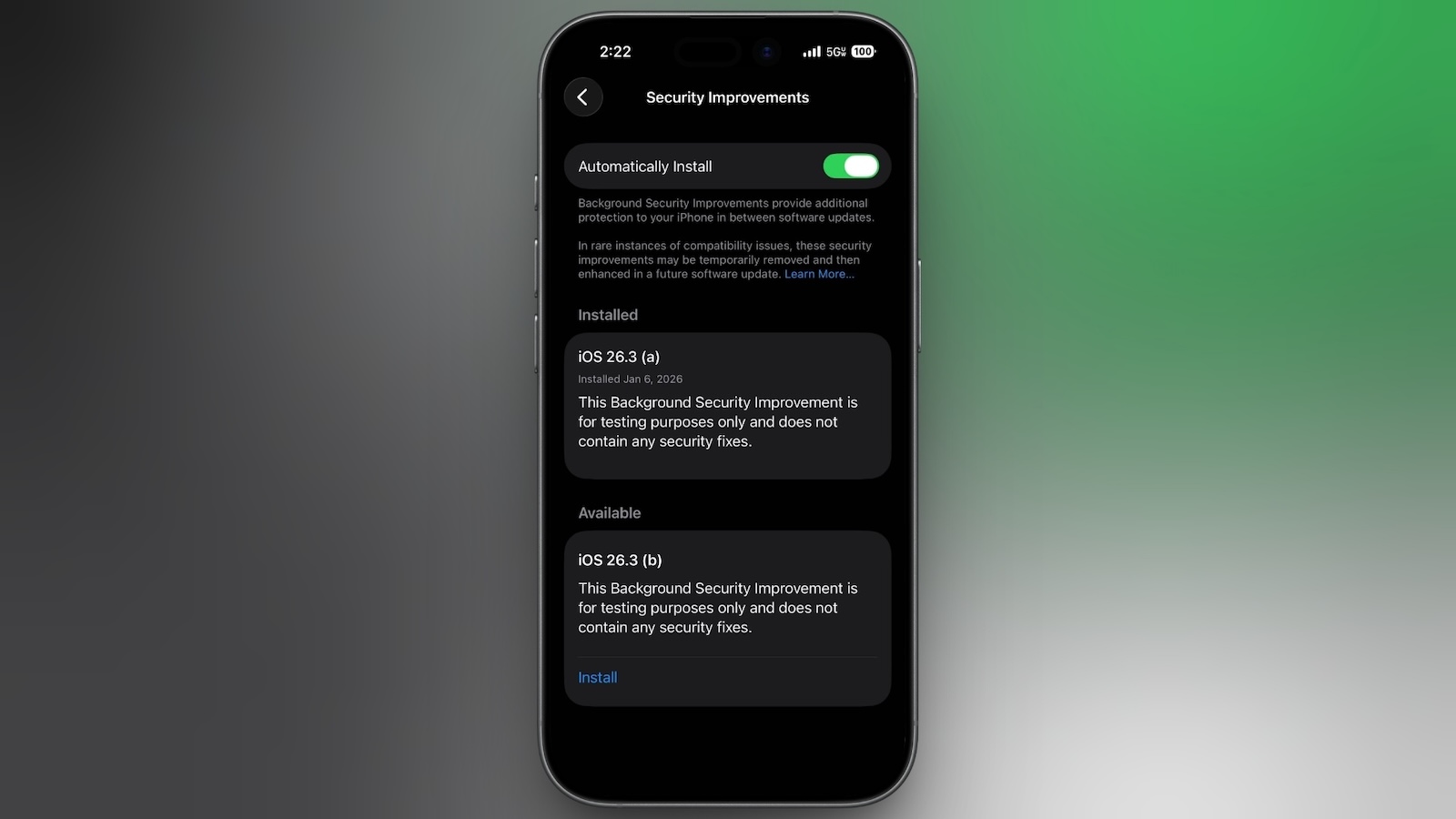
Recently, Apple has been rigorously testing its new Background Security Improvement feature, a significant step forward in proactive device protection. This feature, which first made its debut with iOS 26.1, iPadOS 26.1, and macOS Tahoe 26.1, is designed to deliver crucial security enhancements without requiring a full operating system update. Following a previous test earlier this week, Apple has rolled out a second wave of testing. Developers and public beta testers running iOS 26.3, iPadOS 26.3, or macOS Tahoe 26.3 can now install this latest Background Security Improvement update, helping Apple refine this vital protection before its wider release.
This initiative underscores Apple's ongoing commitment to user safety, ensuring that your iPhone, iPad, and Mac devices remain fortified against emerging threats. But what exactly are Background Security Improvements, why are they so important, and how do they keep you safer?
The Ever-Evolving Digital Threat Landscape
The internet is a vast and dynamic space, and with its countless benefits come inherent risks. Malicious actors, often referred to as hackers, are continuously searching for weaknesses in software to gain unauthorized access to devices, steal data, or disrupt services. These weaknesses, known as vulnerabilities, can range from minor flaws to critical loopholes that allow full control over a system. The speed at which new vulnerabilities are discovered and exploited is ever-increasing, making it a constant race for security teams to patch them before they cause widespread damage.
Traditional software updates, while essential, typically follow a slower release cycle. Major operating system updates, like iOS 26 or macOS Tahoe 26, are released annually, with smaller incremental updates (e.g., 26.1, 26.2) appearing every few weeks or months. While these updates include numerous bug fixes, new features, and security patches, the time between them can leave a window of opportunity for attackers to exploit newly discovered vulnerabilities. This is where a more agile, proactive security mechanism becomes indispensable.
Apple's approach with Background Security Improvements directly addresses this challenge. By providing a way to deliver focused security patches quickly and independently of the broader OS update cycle, Apple can respond with unprecedented speed to critical threats. This minimizes the exposure time for potential exploits, strengthening the overall security posture of your devices and safeguarding your digital life more effectively than ever before.
What Are Background Security Improvements?
Apple describes Background Security Improvements as features that provide "additional security protections between software updates." This means they are smaller, targeted updates specifically designed to address security vulnerabilities in key areas of your device's operating system and core applications. Think of them as rapid, precision strikes against security threats, delivered quickly and efficiently.
These improvements focus on crucial components that are frequently targeted by attackers or are central to your device's secure operation. Specifically, Apple states that these updates enhance protection for:
- Safari: Apple's web browser, a primary gateway to the internet, where many threats originate.
- WebKit: The underlying rendering engine that powers Safari and many other apps on your device for displaying web content. Securing WebKit is paramount for protecting you from malicious websites and web-based attacks.
- Other system libraries: These are fundamental pieces of code that various apps and the operating system itself rely on. Protecting them is crucial to prevent attackers from gaining deeper access to your device.
The beauty of Background Security Improvements lies in their ability to be installed independently of a full iOS, iPadOS, or macOS update. This allows Apple to push out vital security fixes as soon as they are ready, significantly reducing the window of vulnerability that users might otherwise face while waiting for the next comprehensive software update.
Why These Updates Are Crucial for Your Digital Safety
The rationale behind Background Security Improvements is simple yet profound: to create a more resilient and continuously protected ecosystem for Apple users. Here's why these updates are so vital:
- Rapid Response to Zero-Day Exploits: A "zero-day exploit" refers to a software vulnerability that is unknown to the software vendor (like Apple) and therefore has no existing patch. Once discovered by malicious actors, it can be exploited "in the wild" before developers have a chance to fix it. Background Security Improvements allow Apple to deploy fixes for these critical, newly discovered vulnerabilities almost immediately, drastically shortening the time attackers have to compromise devices.
- Proactive Defense: Instead of waiting for the next major software release, which might be weeks or months away, these improvements offer proactive defense. They allow Apple to strengthen defenses as soon as potential threats are identified, before they can become widespread problems.
- Enhanced Privacy and Data Protection: Many vulnerabilities can be exploited to access sensitive personal data, such as login credentials, financial information, or private messages. By patching these vulnerabilities swiftly, Background Security Improvements play a critical role in safeguarding your privacy and preventing data breaches.
- Maintaining System Integrity: Beyond data theft, some exploits can corrupt system files, introduce malware, or render your device unusable. By securing core system libraries, these updates help maintain the integrity and stability of your device's operating system.
- Seamless and Timely Protection: For most users, these updates will be seamless, especially if automatic installation is enabled. This ensures that a high level of security is maintained without requiring users to constantly monitor for and manually initiate system-wide updates. It's security that works in the background, so you don't have to constantly worry about it.
In essence, Background Security Improvements represent a more dynamic and responsive security paradigm, designed to keep your Apple devices fortified against the sophisticated and ever-present threats of the digital age.
How to Install Background Security Improvements
One of the key advantages of Background Security Improvements is their ease of installation, offering both manual and automatic options to suit your preferences. Apple has integrated these updates directly into the system settings, making them straightforward to manage.
Manual Installation
If you prefer to have control over when updates are applied, you can manually install Background Security Improvements:
- Open the Settings app on your iPhone or iPad, or System Settings on your Mac.
- Scroll down and tap or click on Privacy & Security.
- Within the Privacy & Security section, scroll down further until you find Background Security Improvements.
- Select the "Install" option. Your device will then download and apply the necessary security enhancements. This process usually requires a quick restart of your device to finalize the installation.
Automatic Installation (Recommended)
For the most convenient and hands-off approach to security, Apple highly recommends enabling automatic installation. This ensures that your device receives critical security updates as soon as they become available, without you needing to do anything.
- Follow the first three steps for manual installation: Go to Settings/System Settings > Privacy & Security > Background Security Improvements.
- Toggle the "Automatically Install" option to the "On" position.
Once "Automatically Install" is toggled on, Background Security Improvements will be automatically installed when they are released. Your device will handle the download and installation in the background, often requiring only a brief restart at a convenient time, or sometimes no visible interruption at all.
What if You Don't Install Them Immediately?
Apple understands that not everyone will immediately install these standalone security improvements. If you opt not to install a Background Security Improvement when it's released, either by not manually initiating it or by disabling automatic installation, there's no need to panic. Apple has designed a fallback mechanism:
Users who choose not to install the Background Security Improvements will still receive these critical updates. The enhancements will simply be bundled and integrated into the next standard software update for your operating system (e.g., iOS 26.4, macOS Tahoe 26.4). While this means you might be exposed to a vulnerability for a longer period compared to those who install the background updates immediately, you will still eventually receive the fix as part of your regular update cycle. However, for maximum protection, installing them as soon as they are available, especially via automatic updates, is always the best practice.
The Evolution of Apple's Rapid Security Responses
The introduction of Background Security Improvements marks a significant evolution in Apple's strategy for delivering timely security patches. This isn't Apple's first venture into providing out-of-band security updates; it builds upon a previous feature known as Rapid Security Response (RSR), which was introduced with iOS 16.
Understanding Rapid Security Response (RSR)
Rapid Security Response was designed to deliver important security fixes even more quickly than standard software updates. These were very small, specific updates that could be applied without a full operating system update, and sometimes even without a restart. The idea was to quickly patch severe vulnerabilities that couldn't wait for the next incremental OS release.
For example, if a critical flaw was discovered in Safari or a core system framework, Apple could push out an RSR update to patch just that specific issue. Users would see these updates listed in their Software Update settings, often with a letter appended to the OS version number (e.g., iOS 16.2.1 (a)).
Challenges and Limitations of RSR
Despite its promising concept, Rapid Security Response wasn't utilized as frequently as some might have anticipated after its introduction. There were a few potential reasons for this, and a notable incident in 2023 highlighted some of the complexities:
- Infrequent Usage: While RSR was a powerful tool, Apple seemed to reserve it for extremely urgent and isolated vulnerabilities. This meant users didn't see it in action very often.
- User Confusion: For some users, the distinction between a standard OS update and an RSR update wasn't always clear, potentially leading to uncertainty about their importance or how they should be handled.
- The 2023 Bug: At one point in 2023, a Rapid Security Response bug created compatibility issues for some users. Specifically, an RSR update caused certain websites, particularly those that relied on specific web technologies or content delivery networks, to display improperly or fail to load. This incident, though temporary and quickly addressed by Apple, highlighted the potential for even small, targeted updates to introduce unforeseen compatibility challenges in a complex software environment. It underscored the delicate balance between rapid deployment and maintaining system stability.
Ultimately, whether due to these challenges, a desire for a more comprehensive approach, or simply a refinement of their security strategy, Apple decided to phase out RSR in favor of the new Background Security Improvements.
How Background Security Improvements Differ and Improve
Background Security Improvements appear to be Apple's evolution of the rapid security update concept, addressing some of the earlier limitations and offering a more robust solution:
- Broader Scope: While RSR focused on very specific, urgent fixes, Background Security Improvements seem to encompass a slightly broader range of components like Safari, WebKit, and "other system libraries," suggesting a more integrated and comprehensive approach to ongoing security maintenance.
- Seamless Integration: The implementation within the Privacy & Security settings, particularly with the emphasis on automatic installation, suggests a more seamless and less obtrusive user experience. It's designed to truly work in the "background."
- Addressing Compatibility: While Apple still warns of "rare instances of compatibility issues" with Background Security Improvements, the experience gained from RSR likely informs their current testing protocols and rollback mechanisms. The focus on extensive testing with beta users, as seen with the multiple rounds for iOS 26.3 and macOS Tahoe 26.3, indicates a thorough validation process.
In essence, Background Security Improvements represent a more refined, potentially more frequently deployed, and deeply integrated system for delivering critical security patches, learning from the successes and challenges of its predecessor, Rapid Security Response.
Addressing Potential Concerns: Compatibility and Stability
Whenever core system components receive updates, even small ones, there's a natural concern about potential compatibility issues or system instability. Apple is transparent about this, providing a cautionary note: Apple warns that Background Security Updates can result in "rare instances of compatibility issues." This acknowledgment is important and demonstrates Apple's commitment to setting realistic expectations while also reassuring users about their proactive measures.
Why Do Compatibility Issues Occur (Even Rarely)?
Software development, especially for complex operating systems like iOS and macOS, involves intricate interactions between countless components. Even a seemingly small update to a system library or web engine can have unforeseen ripple effects across various applications and services. Factors that can contribute to these rare issues include:
- Deep System Integration: Background Security Improvements target fundamental parts of the operating system and key applications like Safari and WebKit. Changes at this foundational level, while necessary for security, can sometimes interact unexpectedly with third-party apps or specific configurations that weren't extensively tested in a beta environment.
- Vast Ecosystem: With millions of apps and billions of devices, the sheer diversity of hardware models, software versions, and user setups means it's nearly impossible to test every single permutation before a wide release.
- Novel Exploits: Some security fixes might involve fundamental changes to how certain data is processed or how permissions are handled. While these changes thwart attackers, they might inadvertently affect a legitimate (but perhaps unconventional) way an older app or website was designed to function.
Apple's Mitigation Strategy
Crucially, Apple doesn't just issue a warning; they also outline a clear strategy for addressing such rare occurrences:
"Should that occur, the updates may be temporarily removed and enhanced in a subsequent software update."
This statement provides significant reassurance. It means:
- Temporary Removal: If a Background Security Improvement causes widespread or critical compatibility problems, Apple has the ability to temporarily withdraw that specific update. This prevents further users from encountering the issue.
- Enhancement and Re-release: After removal, Apple's engineers would analyze the problem, refine the update, and re-release an enhanced version that addresses both the security vulnerability and the newfound compatibility issue. This revised update would then be delivered either as a new Background Security Improvement or integrated into a standard software update.
This process demonstrates a responsible approach to software deployment, prioritizing both security and user experience. The fact that Apple is conducting extensive beta testing for these updates, as highlighted by the multiple rounds for iOS 26.3 and macOS Tahoe 26.3, further underscores their commitment to identifying and resolving potential issues before the updates reach the general public. While the possibility of a rare compatibility glitch exists, the benefits of staying protected against prevalent and evolving cyber threats far outweigh this minimal and well-managed risk.
The Broader Picture: A Culture of Continuous Security
Background Security Improvements are not an isolated feature but rather a testament to Apple's overarching philosophy of "security by design." This philosophy permeates every layer of their ecosystem, from the silicon chips in your device to the software running on them, and extends to the services you use every day. It's a continuous, multi-faceted effort aimed at providing users with industry-leading privacy and security.
Integrated Hardware and Software Protection
Apple devices are unique because Apple controls both the hardware and the software. This vertical integration allows for deep-seated security features that are impossible to replicate in fragmented ecosystems. Features like the Secure Enclave, which securely stores sensitive information like your Touch ID or Face ID data, are directly tied to the hardware. Background Security Improvements fit perfectly into this model, ensuring that even fundamental software components are kept in lockstep with the latest security best practices, leveraging the underlying hardware capabilities for maximum protection.
Transparency and User Control
While Apple strives for seamless and automatic protection, they also empower users with control and transparency. The ability to choose between automatic and manual installation for Background Security Improvements is a prime example. Users can delve into the Privacy & Security settings to understand what protections are in place and how they are delivered. This balance ensures that users feel in control of their devices while still benefiting from Apple's robust security measures.
A Proactive and Responsive Approach
The transition from Rapid Security Response to Background Security Improvements illustrates Apple's iterative and adaptive approach to cybersecurity. They are constantly analyzing the threat landscape, evaluating the effectiveness of their defenses, and refining their methods. This means that as cyber threats become more sophisticated, Apple's security responses evolve to match them, ensuring that your devices are always equipped with the latest defenses.
Ultimately, Background Security Improvements reinforce Apple's commitment to building a trusted environment for its users. They represent a significant step towards a future where critical security updates are delivered more frequently and efficiently, minimizing vulnerability windows and fostering a safer digital experience for everyone in the Apple ecosystem.
Empowering Users: Best Practices for Digital Safety Beyond Updates
While Apple's Background Security Improvements offer an advanced layer of protection, your digital safety is a shared responsibility. Adopting a few best practices can significantly enhance your overall security posture, working in tandem with the protections Apple provides. Think of it as building a strong fortress: Apple provides the walls and guards, but you're responsible for locking the doors and windows.
1. Always Keep Your Software Updated
This is the most fundamental rule. Enable automatic updates for your operating system (iOS, iPadOS, macOS) and for your apps. Background Security Improvements are part of this principle, ensuring you receive critical fixes as soon as they're available. Updates often contain patches for vulnerabilities that could otherwise be exploited by attackers. Don't defer them!
2. Use Strong, Unique Passwords or Passkeys
Password reuse is one of the biggest security risks. If an attacker gains access to your password for one service, they can potentially access all other services where you've used the same credentials. Utilize strong, unique passwords for every account. Consider using Apple's built-in Passwords feature, iCloud Keychain, or a reputable third-party password manager to generate and store complex passwords securely. Even better, use Passkeys where available, as they offer a passwordless, phishing-resistant form of authentication.
3. Enable Two-Factor Authentication (2FA)
Two-Factor Authentication adds an extra layer of security beyond just your password. Even if an attacker somehow gets your password, they would still need a second piece of information (like a code sent to your phone or a biometric scan) to access your account. Enable 2FA for your Apple ID and all other online accounts that offer it.
4. Be Wary of Phishing Attempts
Phishing is a common social engineering tactic where attackers try to trick you into revealing sensitive information (like passwords or credit card numbers) by impersonating legitimate entities (banks, Apple, shipping companies, etc.). Always be suspicious of unexpected emails, messages, or calls asking for personal information. Look for misspelled words, generic greetings, and suspicious links. If in doubt, go directly to the official website or app rather than clicking on links in messages.
5. Review App Permissions
Be mindful of the permissions you grant to apps on your devices. Does a flashlight app really need access to your location or contacts? Regularly review app permissions in your device settings and revoke access if it's not necessary for the app's functionality. This minimizes the data that could be compromised if an app were to be breached.
6. Back Up Your Data Regularly
While not a direct security measure against attacks, regular backups are your safety net. In the event of data loss due to a security incident (like ransomware), hardware failure, or accidental deletion, a recent backup can save you immense grief. Use iCloud Backup or iTunes/Finder backups for your Apple devices.
7. Use a VPN on Public Wi-Fi
Public Wi-Fi networks are often unsecured and can be fertile ground for attackers to intercept your data. When connecting to public Wi-Fi, use a Virtual Private Network (VPN) to encrypt your internet traffic and protect your privacy. Even better, avoid conducting sensitive transactions (like online banking) on public Wi-Fi.
By combining Apple's robust, evolving security features like Background Security Improvements with these diligent personal practices, you create a powerful defense against the vast majority of digital threats. Staying informed and proactive is your best weapon in the ongoing battle for online safety.
Conclusion: A More Secure Future with Apple
Apple's continuous testing and deployment of Background Security Improvements represent a pivotal advancement in how our devices are protected against the ever-present dangers of the digital world. By enabling rapid, targeted security updates for critical components like Safari, WebKit, and other fundamental system libraries, Apple is significantly shortening the window of vulnerability that often exists between major software releases. This proactive approach ensures that your iPhone, iPad, and Mac devices are equipped with the latest defenses, keeping pace with the evolving tactics of cyber threats.
While building upon lessons learned from previous initiatives like Rapid Security Response, Background Security Improvements offer a more refined and seamlessly integrated solution. With options for automatic installation, users can rest assured that their devices are receiving vital protections without constant manual intervention. And even in the rare instance of a compatibility issue, Apple's commitment to temporary removal and enhancement provides a clear path to resolution, demonstrating their dedication to both security and user experience.
Ultimately, this feature underscores Apple's unwavering commitment to user privacy and security. By choosing to install these improvements, especially by enabling automatic updates, you are actively participating in securing your digital life. Combined with sound personal security practices, Background Security Improvements help pave the way for a safer, more resilient computing experience across the entire Apple ecosystem.
This article, "Apple Again Tests Background Security Updates in iOS 26.3 and macOS Tahoe 26.3" first appeared on MacRumors.com
Discuss this article in our forums
from MacRumors
-via DynaSage

Post a Comment