
Apple Seeds Second tvOS 26.2 Release Candidate
Apple TV's Big Update: A Deep Dive into the Second tvOS 26.2 Release Candidate
In the fast-paced world of technology, a software update is always just around the corner. This week, Apple has given us a glimpse into the very near future of its living room ecosystem. The company has released a second Release Candidate (RC) version of tvOS 26.2 for the Apple TV and its corresponding HomePod Software 26.2 for the HomePod lineup. This move has caught the attention of developers and tech enthusiasts alike, signaling that a major public release is imminent and that Apple is diligently polishing the final product.
But what does a "second Release Candidate" even mean? And more importantly, what new features and improvements can you expect when tvOS 26.2 officially arrives? Let's break down everything you need to know about this upcoming update, from exciting new family-friendly features to the behind-the-scenes drama of software development.
What is a Release Candidate, and Why is a Second One a Big Deal?
Before we dive into the new features, it's helpful to understand where a Release Candidate fits into the software development process. Think of it as the final dress rehearsal before opening night. After weeks or months of beta testing, where developers and public testers try out early versions of the software and report bugs, Apple compiles a version that they believe is ready for the public. This is the "Release Candidate."
Typically, a company releases one RC. This version is sent out to the same group of testers for one last check. If no major, show-stopping bugs are found, this exact version is what gets released to millions of users worldwide. However, this time, Apple released a second RC just one day after the first one. The first build was numbered 23K51, and the new one is 23K53.
The release of a second RC almost always means that a significant issue was discovered in the first one. While Apple doesn't provide detailed release notes for these minor revisions, we can infer that a bug critical enough to delay the public launch was found and fixed. This could be anything from a security vulnerability to a performance issue that drains resources or a feature that simply wasn't working as intended. While it might sound like a problem, it's actually a good thing for end-users. It shows Apple's commitment to quality control and its desire to ship a stable, reliable product rather than rushing it out the door with known flaws. This last-minute polish ensures a smoother experience for everyone once the update goes live.
Exciting New Feature: A Dedicated Kids Mode for Apple TV
Perhaps the most anticipated feature in tvOS 26.2 is the introduction of a dedicated Kids Mode within the Apple TV app. This is a game-changer for parents and families who use the Apple TV as their primary entertainment hub. For years, parents have relied on Apple's general "Restrictions" settings to manage content, but a dedicated, user-friendly mode specifically for children simplifies this process immensely and creates a much safer and more engaging viewing environment.
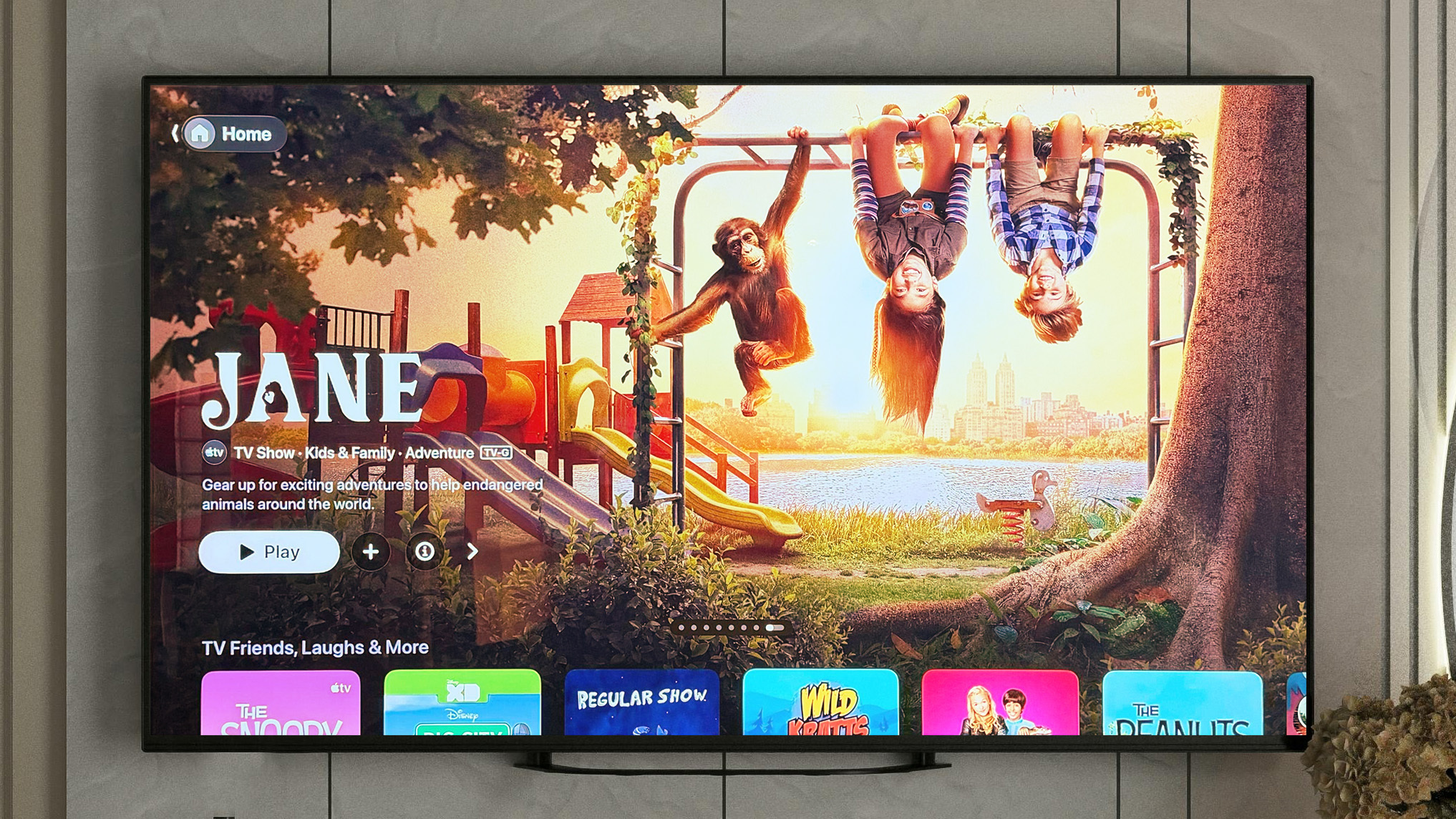
This new mode is tied to children's profiles, making the experience personal and secure. When a child's profile is active, the Apple TV app will transform its interface to be more visually appealing and accessible for younger users. Here’s what we expect from this new feature:
A Curated and Safe Content Universe
The core of Kids Mode is content curation. When activated, it will likely filter the entire library of Apple TV+, purchased movies and shows, and content from connected streaming apps to display only age-appropriate titles. This means parents can hand over the remote with peace of mind, knowing their children won't accidentally stumble upon a horror movie or a mature drama. The interface will likely feature bright colors, large icons, and character-driven navigation, making it easy for even young children to find their favorite shows independently.
Simplified Navigation and Discovery
The standard Apple TV interface, while clean, is designed for adults. Kids Mode will simplify this. Instead of complex menus and text-heavy descriptions, children will be greeted with a visual gallery of their favorite characters and shows. Content will likely be organized into simple categories like "Cartoons," "Adventure," "Animals," or by popular networks like PBS Kids or Disney. This not only makes it easier for kids to use but also helps them discover new, parent-approved content in a fun and interactive way.
Enhanced Parental Controls
While the mode itself is a form of parental control, it will likely be backed by a robust set of underlying settings. Parents will probably be able to customize the experience for each child's profile, setting specific age ratings (e.g., G-rated only, or up to TV-Y7). It could also include features like screen time limits, the ability to disable in-app purchases completely within the mode, and a PIN-protected exit to prevent kids from switching back to an adult profile without permission. This level of control is what parents have been asking for and brings the Apple TV experience in line with competitors like Netflix and Disney+ that have long offered excellent kid-friendly profiles.
A Welcome Change: Creating Profiles Without an Apple Account
Another significant, though less flashy, new feature in tvOS 26.2 is the ability to create a user profile without linking it to an Apple Account. Currently, to create a new profile on Apple TV for personalized recommendations and "Up Next" queues, each user needs their own Apple ID. This can be cumbersome, especially for temporary users.
This new feature opens up a world of convenience for several common scenarios:
- Guest Profiles: Have friends or family staying over for the weekend? You can now create a temporary guest profile for them in seconds. They can build their own "Up Next" list without an Apple ID and without messing up your carefully curated recommendations. When they leave, you can simply delete the profile.
- Enhanced Privacy: Some users may not want to link their primary Apple Account, which is tied to their purchases, photos, and messages, to a shared living room device. This option allows them to create a local, device-only profile for a more private viewing experience.
- Use in Public or Semi-Public Spaces: This is a huge benefit for businesses like hotels, waiting rooms, or Airbnb hosts. They can set up a generic "Guest" profile on the Apple TV in their rooms, allowing visitors to use the device without needing to sign in or risk leaving personal data behind.
This seemingly small change reflects a deeper understanding of how shared devices are used in the real world. It removes a point of friction and makes the Apple TV a more flexible and user-friendly device for households and businesses alike.
What Does This Mean for HomePod Users?
The update isn't just for the Apple TV. HomePod and HomePod mini owners will also be getting HomePod Software 26.2. Since the HomePod's operating system is based on tvOS, their updates are developed in tandem and released at the same time. While the visual features like Kids Mode won't apply to the speaker, the update is still crucial.
For the HomePod, these updates typically focus on under-the-hood improvements. Users can expect to see enhancements in:
- Stability and Performance: General bug fixes that make the HomePod more reliable and responsive.
- Siri Improvements: Apple is constantly working to make Siri faster and more accurate. This update could include better voice recognition or a deeper understanding of commands related to music, podcasts, and smart home control.
- HomeKit Reliability: As the heart of a smart home, the HomePod's connection to HomeKit devices is critical. Updates often improve the speed and reliability of controlling lights, thermostats, and locks.
- Interconnectivity: Enhanced performance when using features like Intercom or creating stereo pairs.
Keeping your HomePods updated is essential for ensuring your entire Apple ecosystem works together seamlessly.
How to Get the Update
Right now, the second Release Candidate of tvOS 26.2 is only available to registered developers and participants in the public beta testing program. If you are part of one of these programs, you can download the update directly on your device.
To do so, navigate to the Settings app on your Apple TV. From there, go to System > Software Update. Your device will check for the new version, and you can begin the download and installation process. Remember, as this is still pre-release software, it's always best to install it on a secondary device if possible, though a Release Candidate is generally very stable.
For the general public, the wait is almost over. The release of a second RC strongly suggests that the final, official version of tvOS 26.2 and HomePod Software 26.2 will be released to everyone very soon, most likely sometime next week.
Final Thoughts: A Refined Experience is on its Way
The upcoming tvOS 26.2 update is shaping up to be a fantastic release focused on quality-of-life improvements for families and multi-user households. The introduction of a dedicated Kids Mode is a significant step forward in making the Apple TV a more family-friendly platform, providing parents with both control and peace of mind. The ability to create profiles without an Apple Account adds a much-needed layer of flexibility for guests and privacy-conscious users.
The journey to this release, marked by the unusual appearance of a second Release Candidate, highlights Apple's meticulous attention to detail. It's a reminder that the company is willing to take an extra day or two to squash a critical bug, ensuring that the final product that reaches millions of homes is as stable and polished as possible. Get ready to update your devices next week and enjoy a smarter, safer, and more convenient living room experience.
This article, "Apple Seeds Second tvOS 26.2 Release Candidate" first appeared on MacRumors.com
Discuss this article in our forums
from MacRumors
-via DynaSage
