iPhone Driver's License Feature in Apple Wallet App Now Live in Illinois
Your iPhone is Now Your ID: Apple Wallet Adds Illinois Driver's Licenses
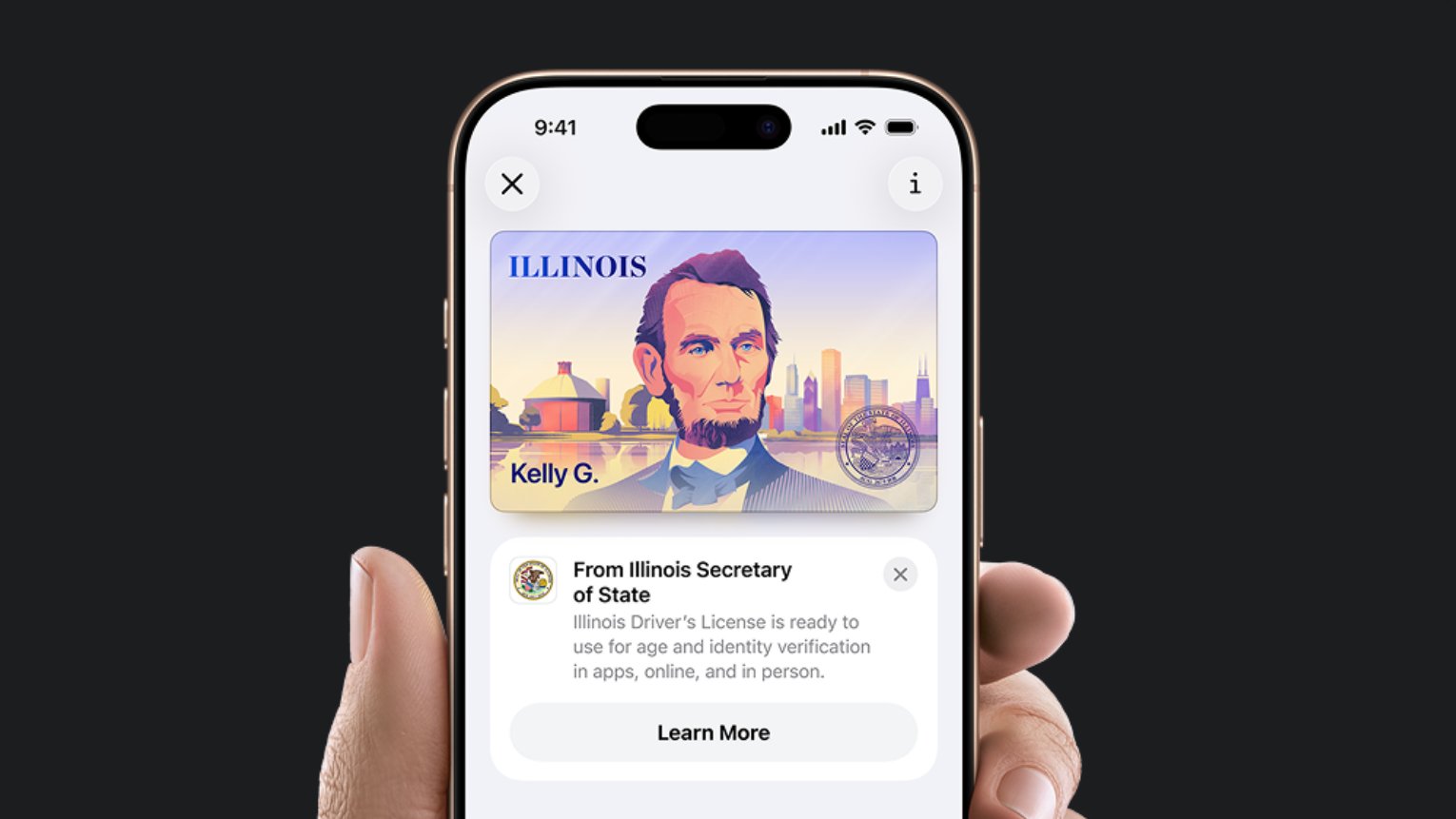
For years, our smartphones have been replacing the physical items we carry every day. They replaced our maps, our cameras, our music players, and for many, even our credit cards. Now, Apple is taking the next logical step in decluttering our pockets and purses: turning your iPhone and Apple Watch into your official, state-issued identification. The latest state to embrace this digital future is Illinois, whose residents can now add their driver's license or state ID directly to the Apple Wallet app. This marks a significant move towards a more convenient, secure, and contactless world of identity verification.
This new feature offers a streamlined way to present your ID at select airport security checkpoints, businesses, and venues. Imagine gliding through the TSA line, simply tapping your phone to verify your identity without ever reaching for your wallet. Or picture proving your age at a restaurant with a quick glance at your watch. This isn't science fiction; for residents in a growing number of U.S. states, it's now a reality. In this guide, we'll explore everything you need to know about this innovative feature, from how it works and where you can use it, to a step-by-step tutorial on adding your Illinois ID to your Apple Wallet today.
What Exactly is a Digital ID in Apple Wallet?
Before diving into the specifics for Illinois, it's important to understand what a digital ID in Apple Wallet is—and what it isn't. It's not just a simple photograph or a scanned copy of your physical driver's license. That would be insecure and easily forged. Instead, an ID in Apple Wallet is a secure, digital credential issued and verified by the state's official licensing authority (in this case, the Illinois Secretary of State's office).
This digital version of your ID leverages the advanced security features built into your iPhone and Apple Watch. The information is stored in the Secure Enclave, a dedicated hardware-based security component that is isolated from the main processor and operating system. This means your identity data is encrypted and protected from tampering or theft, even if the rest of your device is compromised. When you need to present your ID, you must authenticate the request using the same technology you use to unlock your device: Face ID or Touch ID. This ensures that only you can access and display your identification, preventing anyone else from using it if your device is lost or stolen.
Privacy and Security at its Core
One of the most significant advantages of a digital ID is the enhanced privacy it offers compared to its physical counterpart. When you hand over your plastic license to a bartender to prove you're over 21, they see all your information: your full name, your home address, your date of birth, your height, and more. Most of that information is completely irrelevant for the task at hand.
IDs in Apple Wallet are designed to solve this problem through a concept known as "selective disclosure." When a compatible reader requests your information, your iPhone will show you exactly what is being asked for. For an age-restricted purchase, it might only ask to confirm that you are "Over 21." You can then consent to share only that specific piece of information, without revealing your birthdate, address, or other personal details. This "data minimization" is a cornerstone of modern digital privacy, giving you granular control over who sees your information and why. Apple has built the system so that neither Apple nor the state issuing the ID can see when or where you use it, ensuring your movements and transactions remain private.
Illinois Joins the Digital Frontier
The state of Illinois has officially launched support for this feature, becoming the latest in a growing list of states to offer digital identification to its residents. After being announced, the capability went live, allowing millions of Illinoisans to digitize their most important credential. This is a major step forward for the state, especially for those living in or traveling through major hubs like Chicago, where the feature is already supported at key locations.
For residents, this means less fumbling for a wallet and a faster, more hygienic way to get through verification points. It's about a future where your essential credentials live alongside your payment cards and boarding passes, all securely accessible from the devices you use most. While it won't completely replace your physical ID just yet—it's still wise to carry it as a backup and for places that don't yet accept digital IDs—it represents a powerful and convenient alternative for a growing number of situations.
Where Can You Use Your New Digital ID?
The utility of a digital ID depends entirely on where it's accepted. While adoption is still in its early stages, the network of participating locations is expanding, particularly in travel and age-verification scenarios.
At the Airport: A Smoother TSA Experience
One of the primary and most compelling use cases for IDs in Apple Wallet is at Transportation Security Administration (TSA) checkpoints in airports. The feature is currently accepted at participating security lanes in more than 250 airports across the United States. For Illinois residents, this includes major hubs like Chicago O'Hare International Airport (ORD) and Chicago Midway International Airport (MDW).
The process is designed to be seamless and secure:
- When you reach the TSA identity verification podium, you'll see a special reader.
- Instead of handing your physical ID to the TSA officer, you simply hold the top of your iPhone or the display of your Apple Watch near the reader.
- Your device will prompt you to authenticate with Face ID or Touch ID. This is a crucial step—it confirms that you are the one presenting the ID.
- Once authenticated, the necessary identity information is transmitted securely and wirelessly to the TSA's reader. The TSA officer will see your verified name and photo on their screen to confirm your identity.
Throughout this entire process, your phone never leaves your hand. You don't have to take off a protective case or worry about placing your ID on a public surface. It's a faster, more private, and more hygienic way to navigate airport security.
Around Town: Businesses and Venues
Beyond the airport, digital IDs can also be used to verify your age or identity at a variety of businesses and venues. This could include restaurants, bars, retail stores selling age-restricted items, or event venues. The process is similar to using it at the TSA: the business would have a compatible reader, and you would tap your device to present your credentials. As mentioned earlier, this is where the privacy benefits truly shine, as you can often confirm you meet an age requirement without sharing any other personal data.
However, it's important to note that the rollout for businesses is much more decentralized than the TSA program. Currently, there is no comprehensive, public list of every specific business that accepts Apple Wallet IDs. Adoption is growing, but it will take time for more merchants to invest in the necessary technology and training. For now, it's best to think of this as a convenient option where available, but not yet a universal replacement for your physical card.
Step-by-Step Guide: How to Add Your Illinois ID to Apple Wallet
Ready to add your Illinois driver's license or state ID to your iPhone? The process is straightforward and takes just a few minutes. Before you begin, make sure you have your physical ID card handy, as you'll need to scan it.
- Open the Wallet App: Find and tap the Wallet app on your iPhone.
- Tap the Plus Button: In the top-right corner of the screen, tap the plus sign (+) to add a new card.
- Select Your ID Type: You will see several options like "Debit or Credit Card" and "Transit Card." Choose "Driver's License or State ID."
- Choose Your State: Select "Illinois" from the list of available states.
- Scan Your Physical ID: Your iPhone will activate the camera. Follow the on-screen instructions to scan the front and back of your physical driver's license or state ID card. Make sure you are in a well-lit area and avoid glare for the best results.
- Verify Your Identity with a Selfie: To prevent fraud and ensure you are the legitimate owner of the ID, you'll be prompted to complete a series of facial movements and take a selfie. This photo is securely matched against the picture on your ID card by the state's verification system.
- Submit for Verification: Once you've completed all the steps, your information will be sent securely to the Illinois Secretary of State for review and approval. This process can be instant, but may sometimes take longer. You will receive a notification once your ID has been successfully added to your Wallet.
Once approved, your ID will appear in your Wallet app. You can also add it to your paired Apple Watch directly from the Watch app on your iPhone, allowing you to use your wrist for verification.
For a visual walkthrough of the process, check out the video below:
Are Your Devices Compatible? System Requirements
To use this feature, you'll need to have relatively modern Apple hardware and software. This is primarily because the security of your digital ID relies on specific hardware components like the Secure Enclave and the latest software protections.
Apple states that the requirements are as follows:
- For iPhone: You must have an iPhone 8 or a later model, and it must be running iOS 16.5 or a more recent version.
- For Apple Watch: You need an Apple Watch Series 4 or a later model, running watchOS 9.5 or a newer version.
If you meet these requirements, you are all set to add your ID to your Wallet. If not, you may need to update your device's software or consider a hardware upgrade to take advantage of this feature.
A Growing Movement: Which Other States Offer Digital IDs?
Illinois is the newest member of an expanding club of states and territories that support IDs in Apple Wallet. This state-by-state rollout reflects the complex nature of coordinating with different government agencies and motor vehicle departments. The feature is also available in:
- Arizona
- California
- Colorado
- Georgia
- Hawaii
- Iowa
- Maryland
- Montana
- New Mexico
- North Dakota
- Ohio
- West Virginia
- Puerto Rico
The trend isn't limited to the United States. In a sign of growing global interest, Japan's national identity card, the "My Number Card," can also be added to Apple Wallet.
What's on the Horizon?
Apple has already announced a list of other states that are planning to offer this feature in the future. While no specific timelines have been provided, residents of the following states can look forward to eventually joining the digital ID revolution:
- Connecticut
- Kentucky
- Mississippi
- Oklahoma
- Utah
As technology and regulations evolve, it's likely that even more states will come on board, moving us closer to a future where a digital ID is a universally accepted standard.
The Future is in Your Wallet
The launch of digital driver's licenses and state IDs in Illinois is more than just a new tech gimmick; it's a meaningful step towards a more secure and convenient digital life. By combining state-of-the-art security with unparalleled convenience, Apple and its partner states are redefining what it means to carry identification. While the physical card will likely remain a necessary backup for the foreseeable future, the rapid expansion of this program signals a clear shift in how we will prove our identity in the years to come. For Illinois residents with a compatible device, the future is now—and it's waiting in your Apple Wallet.
This article, "iPhone Driver's License Feature in Apple Wallet App Now Live in Illinois" first appeared on MacRumors.com
Discuss this article in our forums
from MacRumors
-via DynaSage

Post a Comment