ChatGPT Group Chats Now Available Worldwide
Team Up with AI: OpenAI's ChatGPT Group Chats Are Here to Revolutionize Collaboration
For years, our conversations with artificial intelligence have been a solitary affair—a one-on-one dialogue between a human and a machine. But that's all about to change. In a significant move that pushes the boundaries of collaborative technology, OpenAI has officially announced the worldwide rollout of group chats in ChatGPT. What started as a small-scale test just last week has, thanks to overwhelmingly positive feedback, been expanded for everyone to use.
This new feature transforms ChatGPT from a personal assistant into a powerful team collaborator, allowing multiple friends, family members, or coworkers to join a single conversation with the AI. It’s a simple yet profound shift that opens up a universe of new possibilities for brainstorming, planning, and problem-solving. Get ready to invite AI to your next team meeting, trip-planning session, or family debate.
What Exactly Are ChatGPT Group Chats?
At its core, the concept is incredibly intuitive. Imagine your favorite messaging app, like WhatsApp or iMessage, where you have group conversations with friends. Now, imagine adding a new member to that group who happens tobe an all-knowing, incredibly creative, and endlessly patient assistant—that’s ChatGPT. A group chat is a shared, collaborative space where up to 20 people can interact with each other and with ChatGPT simultaneously.
Every member of the group can see the full conversation, ask questions, and build upon the ideas shared by others. The AI, in turn, can see the entire context of the chat and provide responses that are relevant to the ongoing discussion. It’s designed to be a seamless, interactive experience that feels less like using a tool and more like working with a highly capable team member. These group conversations are kept neatly organized in a separate section of your ChatGPT sidebar, ensuring they don’t get mixed up with your private, one-on-one chats.
Unlocking a World of Possibilities: Creative Ways to Use Group Chats
So, what can you actually do with a collaborative AI? The applications are as vast as your imagination. OpenAI has suggested a few starting points, but the true potential lies in how users will integrate this tool into their daily lives. Here are some detailed scenarios where ChatGPT Group Chats can be a true game-changer.
Supercharge Your Travel Planning
Planning a trip with friends is notoriously difficult. Coordinating schedules, agreeing on destinations, and finding activities that please everyone can quickly become a logistical nightmare. This is where a group chat with ChatGPT shines.
Imagine you and four friends want to plan a weekend getaway. You can create a group chat and start by asking, "We're looking for a relaxing weekend trip within a 3-hour drive of San Francisco. We're interested in hiking, good food, and maybe some wine tasting. Can you give us some ideas?" ChatGPT can instantly suggest destinations like Napa Valley, Carmel-by-the-Sea, or Lake Tahoe, providing pros and cons for each.
From there, the collaboration deepens. One friend might ask, "Can you find a dog-friendly Airbnb in Napa for 5 people under $400 a night?" Another could follow up with, "What are some highly-rated Italian restaurants in that area that can accommodate a group?" ChatGPT can handle these multiple streams of inquiry, acting as your collective travel agent. It can help build a shared itinerary, suggest packing lists, and even settle debates on where to eat, all within one organized conversation.
The Ultimate Creative Brainstorming Partner
For creative teams, marketers, designers, or writers, the "blank page" can be a daunting obstacle. Group chats can transform brainstorming sessions from unstructured meetings into dynamic, idea-generating powerhouses.
Let's say a marketing team is tasked with coming up with a new slogan for an eco-friendly coffee brand. In their ChatGPT group, they can start by feeding the AI information about the brand's values, target audience, and unique selling points. Then, the team can ask, "Generate 20 slogans that emphasize sustainability and great taste."
As the AI provides suggestions, team members can riff on them. A designer might say, "I like the 'Sustain Your Day' idea. @ChatGPT, can you create some visual concepts based on that slogan?" A copywriter could add, "Let's explore a more playful tone. @ChatGPT, give us five slogans that use a pun related to coffee and the environment." The AI becomes a tireless brainstorming engine, constantly providing new angles and material for the human team to refine, discuss, and build upon, fostering a more collaborative and efficient creative process.
Conquer Group Projects for School and Work
Students and professionals alike know the challenges of group projects. Keeping everyone on the same page, consolidating research, and structuring the final output can be chaotic. ChatGPT can act as the project manager and research assistant that every group wishes they had.
A group of university students working on a history paper can create a chat and begin by pasting in their research articles and notes. They can ask, "@ChatGPT, can you summarize the key arguments from these three articles about the Roman Empire?" The AI can provide concise summaries, helping everyone quickly get up to speed.
As they work, they can use the AI to formulate a thesis statement, create an outline for the paper, and even check their citations for proper formatting. If someone has a question like, "What was the economic impact of the Punic Wars?" ChatGPT can provide a detailed answer right in the chat, keeping the information accessible to the entire group. It centralizes knowledge and streamlines the workflow, ensuring the final project is cohesive and well-researched.
Settle Debates and Make Everyday Decisions
On a lighter note, group chats are perfect for settling those fun, low-stakes arguments that pop up among friends and family. Who really wrote that song? Was that actor in that movie? Instead of everyone pulling out their phones to Google separately, you can just ask ChatGPT in the group chat for a definitive answer.
It's also great for simple decision-making. Imagine a family trying to decide on a movie for movie night. Everyone can list their preferences, and then ask, "@ChatGPT, find a movie that is a sci-fi comedy, rated PG-13, and is available on Netflix." The AI can cut through the indecision and provide a list of perfect options, making it easier to find something everyone can agree on.
Getting Started: Your Step-by-Step Guide
OpenAI has made creating and joining group chats incredibly simple. If you're ready to dive in and start collaborating, here’s a quick guide to get you started:
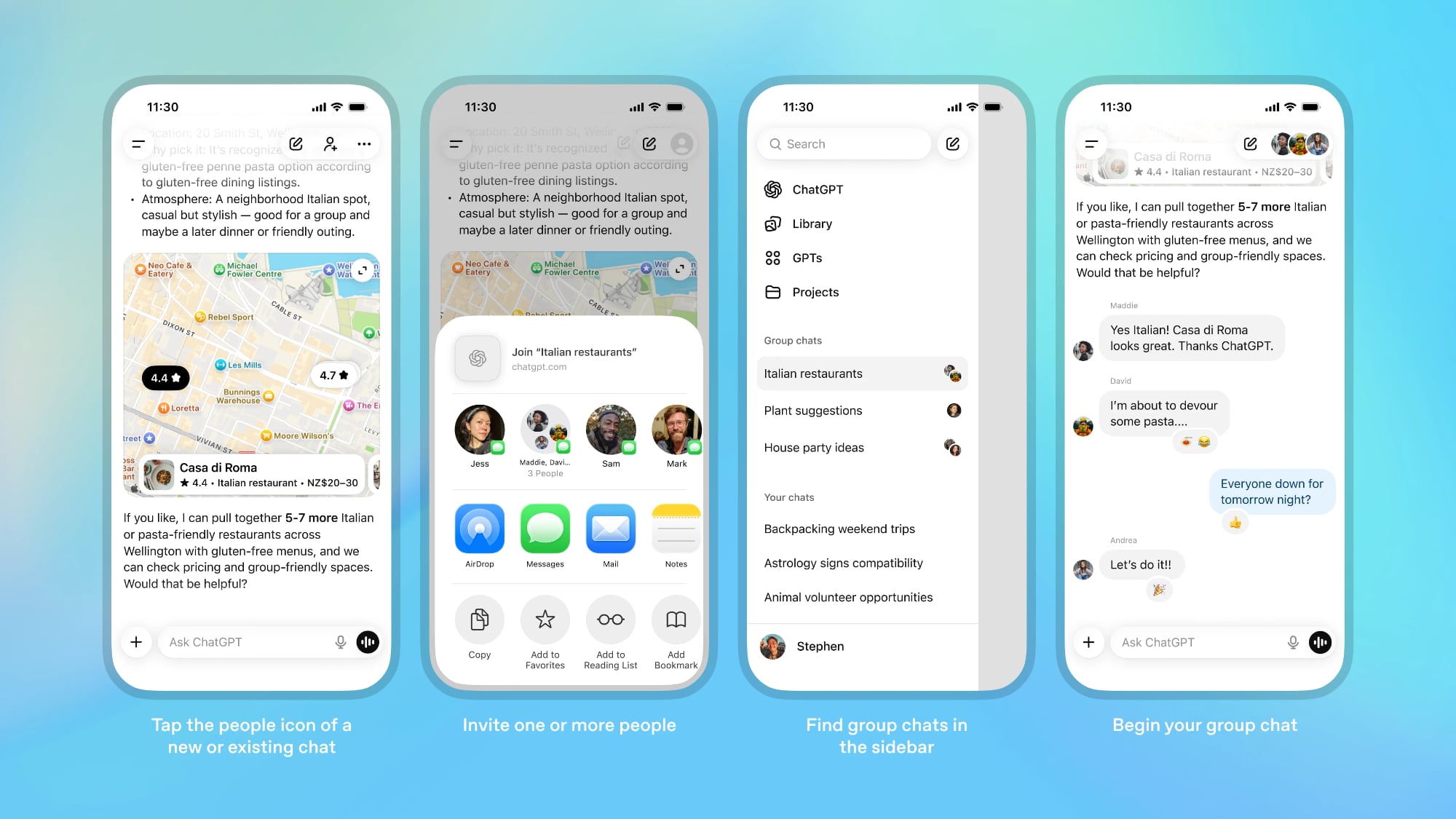
- Step 1: Create Your Group Chat. To start a new group, simply open ChatGPT (on the web or in the app) and look for a small "people" icon in the top right corner of any new or existing chat. Tapping this will give you the option to create a group.
- Step 2: Invite Your Collaborators. Once the group is created, ChatGPT will generate a unique invitation link. You can share this link with anyone you want to invite—friends, family, or colleagues.
- Step 3: Start the Conversation. Anyone with the link can join the group. It's important to note that anyone in the group can also share the link to invite more people, so be mindful of who you share it with. A group can support up to 20 members, which is plenty for most collaborative tasks.
- Step 4: Find and Manage Your Groups. All your group chats will be neatly organized in their own dedicated section in the sidebar, clearly labeled and separate from your personal conversations. This makes it easy to switch between your solo and team projects.
A New Kind of Social Intelligence for AI
A multi-person conversation is far more complex than a one-on-one chat. To handle this, OpenAI has taught ChatGPT a new set of "social behaviors" specifically for group settings. This isn't just about answering questions; it's about understanding the natural ebb and flow of a group discussion.
One of the most impressive aspects is ChatGPT's ability to decide when to speak and when to stay quiet. It analyzes the context of the conversation to determine if a human-to-human discussion is happening or if its input is required. This prevents the AI from constantly interjecting and overwhelming the chat.
To ensure you can get the AI's attention when you need it, you can simply mention it by typing @ChatGPT in your message. This will prompt it to respond directly to your query, much like tagging a colleague in a work chat. To make the interactions feel even more natural and engaging, ChatGPT can also react to messages with emojis, adding a touch of personality to the conversation.
Your Privacy is a Priority
Whenever you introduce a shared digital space, questions about privacy naturally arise. OpenAI has been clear on this front: your personal ChatGPT history is kept separate. The company states that the group creator's personal "memory" and chat history are never shared with other members of the group.
This means that the AI's responses within the group chat are based solely on the context of that specific conversation. It won't draw on information from your private, one-on-one chats, ensuring your personal data remains confidential. This is a crucial design choice that helps build trust and encourages open collaboration without fear of oversharing personal information.
Who Gets Access? Availability and Pricing
Perhaps the best news of all is the widespread availability of this feature. OpenAI is making group chats accessible to all logged-in ChatGPT users, regardless of their subscription plan. Whether you are using the free version of ChatGPT or are subscribed to a premium plan like Go, Plus, or Pro, you will have full access to create and participate in group chats.
This commitment to broad accessibility ensures that everyone, from students working on a school project to professional teams in a large corporation, can benefit from this powerful new collaborative tool without any financial barriers.
The Road Ahead: What's Next for Collaborative AI?
The introduction of group chats is more than just a new feature; it's a glimpse into the future of human-computer interaction. It marks a significant step towards a world where AI is not just a tool we use individually but an integrated partner in our collaborative endeavors. OpenAI has stated that it will continue to listen to user feedback and refine the feature over time, which means we can likely expect even more sophisticated social behaviors and integrations in the future.
This could be the foundation for AI assistants participating in our work chats on platforms like Slack and Microsoft Teams, or for smart agents helping families manage their shared calendars and to-do lists. The era of solo AI is ending, and the age of the AI teammate has just begun.
This article, "ChatGPT Group Chats Now Available Worldwide" first appeared on MacRumors.com
Discuss this article in our forums
from MacRumors
-via DynaSage

Post a Comment