Things 3.22 Introduces Refreshed Interface and More
Things 3.22: A Stunning Update with New Features for iOS, iPadOS, and More
Cultured Code has released Things 3.22, a major update to its popular task management app. This version boasts a complete visual overhaul, enhanced support for iOS 26 and iPadOS 26, and a host of new features designed to improve your productivity across all your Apple devices, including the Vision Pro.
A Breathtaking Visual Redesign
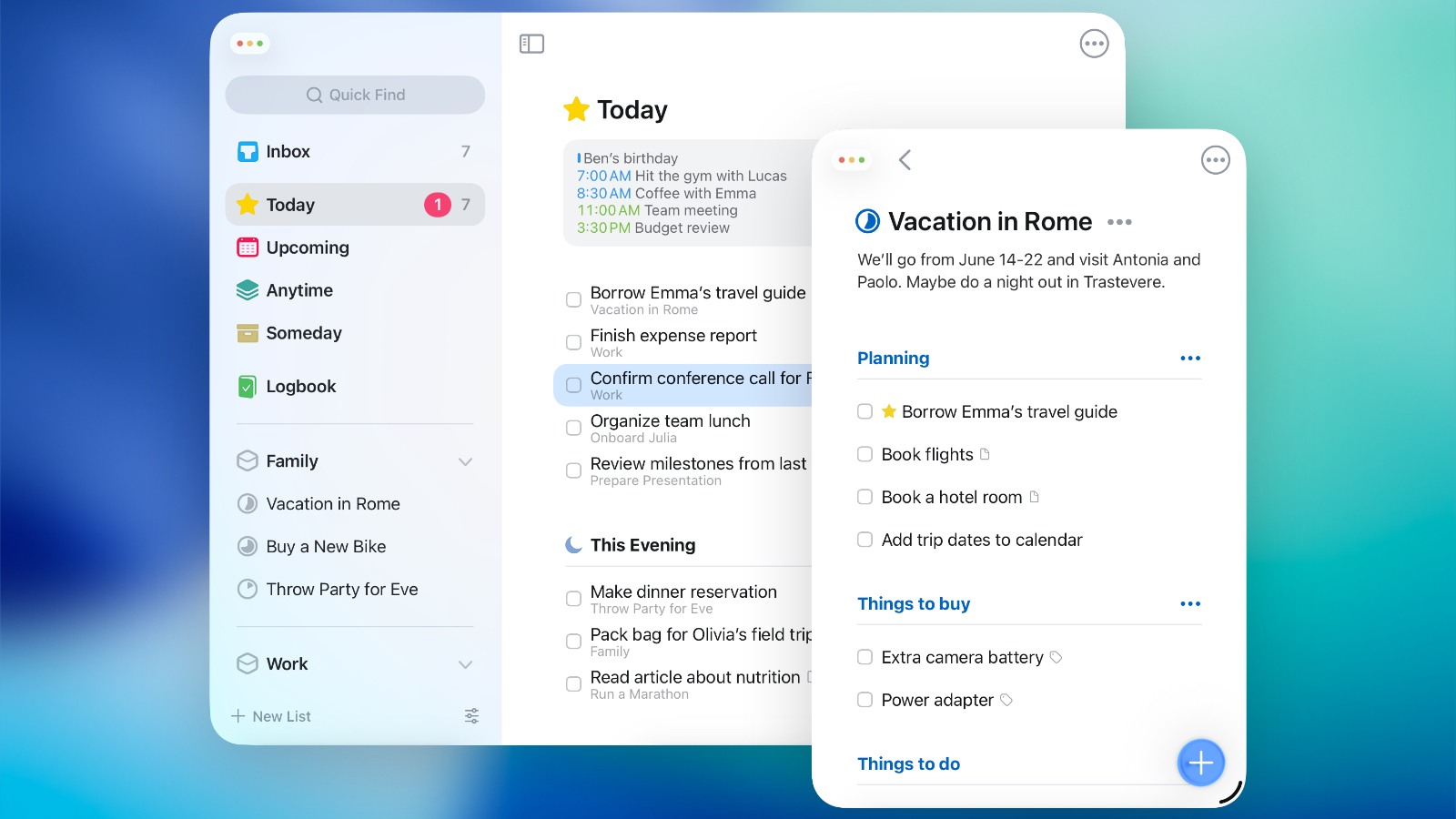
Things 3.22 features a stunning visual refresh, perfectly optimized for the Liquid Glass aesthetic of the latest Apple operating systems. The update includes:
- A brand new app icon: Available in four stylish variants: Default, Dark, Tinted, and Clear.
- Redesigned UI elements: Expect smoother curves in windows, to-dos, dialogs, and controls, creating a more spacious and visually appealing experience.
- Increased visual transparency: The sidebar and other areas benefit from improved clarity and a more open feel.
- Dynamic interface elements: Experience the satisfying glow and scaling of glassy buttons as you interact with them. Even the iconic Magic Plus button now boasts fluid-like deformation.

Enhanced iPadOS 26 Support: Windowed Apps and More
Things 3.22 fully embraces the new Windowed Apps mode in iPadOS 26. This allows for a more flexible and powerful workflow on iPad devices. You can now create new Things windows in several ways:
- Contextual menu actions: Right-click on a list and select "Open in New Window".
- File menu: Utilize the familiar File menu to create new windows.
Furthermore, the update takes full advantage of the new system menu bar accessible by swiping down from the top of the iPad screen. Things' menu structure has been updated to provide more control and intuitive keyboard shortcuts within this enhanced environment.
Revamped Widgets for All Your Devices
The widget system has received a significant upgrade. Now, widgets support new appearance styles including Dark, Tinted, and the sleek new Clear option. This provides greater customization to match your device’s overall theme.
Perhaps the most exciting widget news is the support for the Vision Pro! You can now seamlessly place Things widgets within your immersive Vision Pro workspace, keeping your tasks always within reach.
Quick Controls for Enhanced Speed and Efficiency
Things 3.22 introduces handy quick controls for both macOS and Apple Watch, streamlining your workflow significantly.
macOS Enhancements:
On macOS, you gain access to two new Control Center toggles:
- New To-Do: Quickly create a new task.
- List: Create a new to-do in a user-defined list.
These toggles can be added to your Control Center panel or pinned directly to the menu bar for instant access, making task creation incredibly fast and convenient.
Apple Watch Improvements:
The Apple Watch now features a streamlined New To-Do control, allowing you to create tasks using a variety of methods:
- Swipe input: A quick and intuitive way to add simple tasks.
- Typing: For more detailed task descriptions.
- Voice input: Hands-free task creation using Siri.
Vision Pro Integration: Unleash the Power of Apple's Writing Tools
Things 3.22 takes advantage of Apple's Writing Tools framework on the Vision Pro. This integration opens up a range of powerful editing capabilities directly within the app. Now you can:
- Rewrite text: Refine and improve the wording of your task descriptions.
- Summarize text: Quickly condense lengthy descriptions into concise points.
- Proofread text: Ensure your task descriptions are free of errors.
- Reformat text: Adjust the formatting of your task descriptions for optimal readability.
Improved Spotlight and Apple Shortcuts Integration
Things 3.22 further enhances its integration with Spotlight and Apple Shortcuts. On macOS, you can now create new to-dos directly from Spotlight with a simple command: Type "Create To-Do," press Return, and enter your task title. The task will be added to your Inbox even if Things isn't currently running.
Availability
Things 3.22 is available now! Head over to Cultured Code's website to download the update and experience these fantastic new features for yourself.
Related Links
Learn more about the operating system updates mentioned in this article:
Learn more about Cultured Code and Things 3:
Join the discussion:
This article, "Things 3.22 Introduces Refreshed Interface and More" first appeared on MacRumors.com
from MacRumors
-via DynaSage

Post a Comment