Apple Reintroduces mmWave 5G Antenna Window on iPhone 17 Pro Models in U.S.
The Return of the Antenna Window: Understanding the iPhone 17 Pro's 5G Connectivity
The iPhone 17 Pro and iPhone 17 Pro Max models sold in the United States feature a notable design element: a small antenna window located on the top edge of the device. This seemingly insignificant detail plays a crucial role in enabling the phones to connect to mmWave 5G networks, delivering significantly faster speeds than standard 5G.
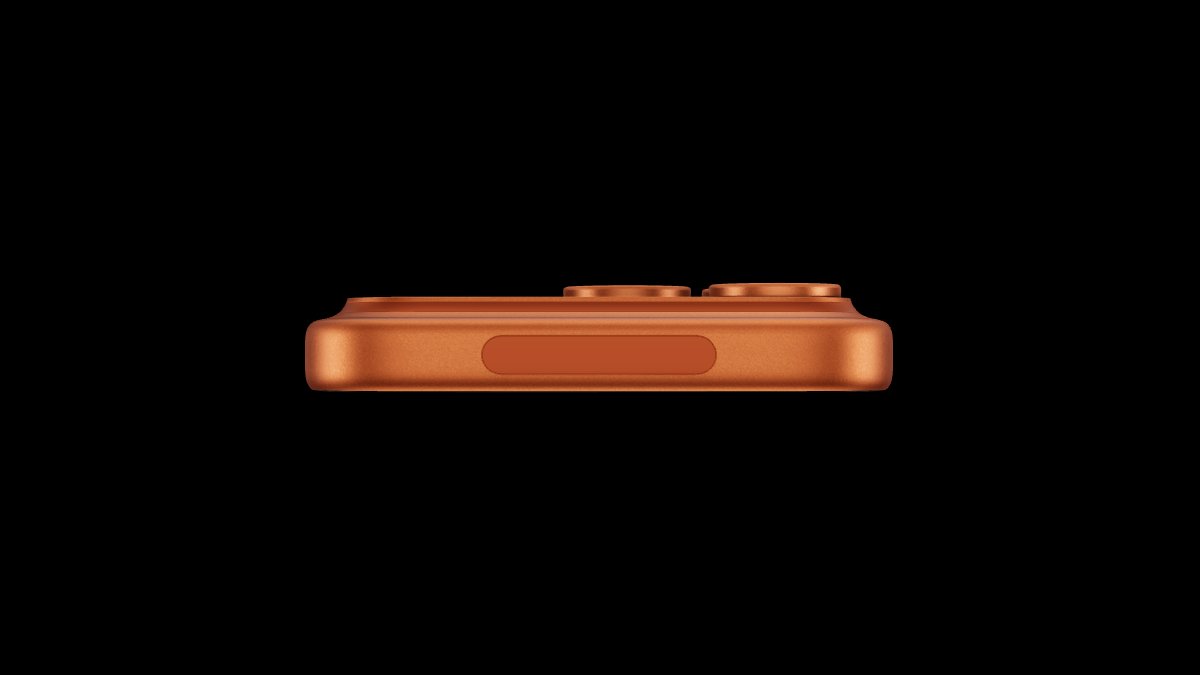
This antenna window wasn't present on the standard iPhone 17, nor is it on the iPhone Air, as neither supports mmWave 5G. Interestingly, this design feature has a history. All iPhone models from the iPhone 12 to the iPhone 15 included this glass antenna window. However, Apple omitted it from the iPhone 16 models, a generation that introduced the Camera Control button on the bottom-right edge—the very location previously occupied by the mmWave antenna window.
Why the Return? The Metal Body Conundrum
The iPhone 17 Pro models boast a sleek new aluminum unibody design. However, this presents a challenge for cellular connectivity. Radio signals, including those used for mmWave 5G, cannot easily penetrate metal. This necessitates a solution to maintain optimal 5G performance. Apple's answer is the reintroduction of the antenna window.
This window, likely made of glass or a more durable material like Ceramic Shield, allows mmWave 5G signals to pass through the device's frame, ensuring strong cellular connectivity. Without it, speeds would be significantly reduced or connection could be lost altogether in areas with mmWave 5G coverage.
Global Availability: A Limited Feature
While mmWave 5G is a game-changer for speed in densely populated areas, it's important to note its limited global reach. All iPhones sold outside the United States lack mmWave 5G support entirely. This is due to the varied deployment of mmWave technology around the world. However, the antenna window is present on iPhone 17 Pro and iPhone 17 Pro Max models in certain international markets like Canada, Japan, Mexico, and the United Arab Emirates. Interestingly, these are all countries where the devices are sold as eSIM-only.
Understanding mmWave 5G vs. Sub-6GHz 5G
To fully appreciate the significance of the mmWave antenna window, it's essential to understand the differences between mmWave and sub-6GHz 5G technologies. Both are 5G standards, but they differ significantly in their capabilities and coverage areas.
mmWave 5G operates on extremely high frequencies, resulting in ultra-fast download and upload speeds. However, these high frequencies don't travel far and are easily obstructed by buildings and other obstacles. This makes mmWave 5G ideal for densely populated urban areas with strategically placed cell towers.
Sub-6GHz 5G, on the other hand, uses lower frequencies, which means its signals can travel farther and penetrate obstacles more effectively. While the speeds are generally slower than mmWave, sub-6GHz provides broader coverage, making it suitable for suburban and rural areas where cell tower density is lower.
The presence of the mmWave antenna window on the iPhone 17 Pro and Pro Max models in specific markets showcases Apple's commitment to providing the fastest possible 5G speeds where the technology is readily available. It's a targeted approach to optimize the user experience in locations with robust mmWave infrastructure.
In Summary: A Small Detail, Big Impact
The mmWave 5G antenna window on the iPhone 17 Pro and iPhone 17 Pro Max models may seem like a minor detail, but its presence significantly impacts the user experience in areas with mmWave 5G coverage. It’s a testament to Apple's dedication to delivering cutting-edge technology where it matters most. By understanding the nuances of mmWave and sub-6GHz 5G, and the role the antenna window plays, consumers can make informed decisions about their mobile connectivity needs.
This article, "Apple Reintroduces mmWave 5G Antenna Window on iPhone 17 Pro Models in U.S." first appeared on MacRumors.com
Discuss this article in our forums
from MacRumors
-via DynaSage

Post a Comment