Select Faster on iPhone With This Two-Finger Trick
Master the Two-Finger Trick: Select Multiple Items on Your iPhone Faster
Your iPhone is packed with handy touch gestures that can significantly improve how you interact with your apps. While some gestures, like pinch-to-zoom, are widely known and used, others remain hidden gems waiting to be discovered. Today, we'll unveil one such hidden gesture that will transform how you select multiple items on your iPhone.

The Two-Finger Drag: Your Shortcut to Faster Selection
If you find yourself tediously tapping each individual item in a list to select them – like emails in your Mail app, messages in your Messages app, or notes in your Notes app – prepare to upgrade your workflow. The two-finger drag gesture allows you to quickly and efficiently select (and deselect) multiple items in a variety of apps, including Contacts, Mail, Messages, Voice Memos, Notes, and virtually any Apple app that displays lists of items.
How to Use the Two-Finger Drag Gesture
This gesture is remarkably simple to learn and use. Follow these steps to become a two-finger drag master:
- Open a compatible app: Start by opening any app that supports multiple item selection, such as Mail, Messages, or Notes.
- Initiate the gesture: Place two fingers on your iPhone's screen and hold them down simultaneously.
- Drag to select: Keeping both fingers in contact with the screen, drag them downwards or upwards to select multiple items. As you drag, the items will become highlighted to indicate their selection status. You can easily deselect items by dragging back over them.
- Perform actions: Once you've selected the desired items, you can perform various actions, such as moving them to a different folder, deleting them, or organizing them as needed.
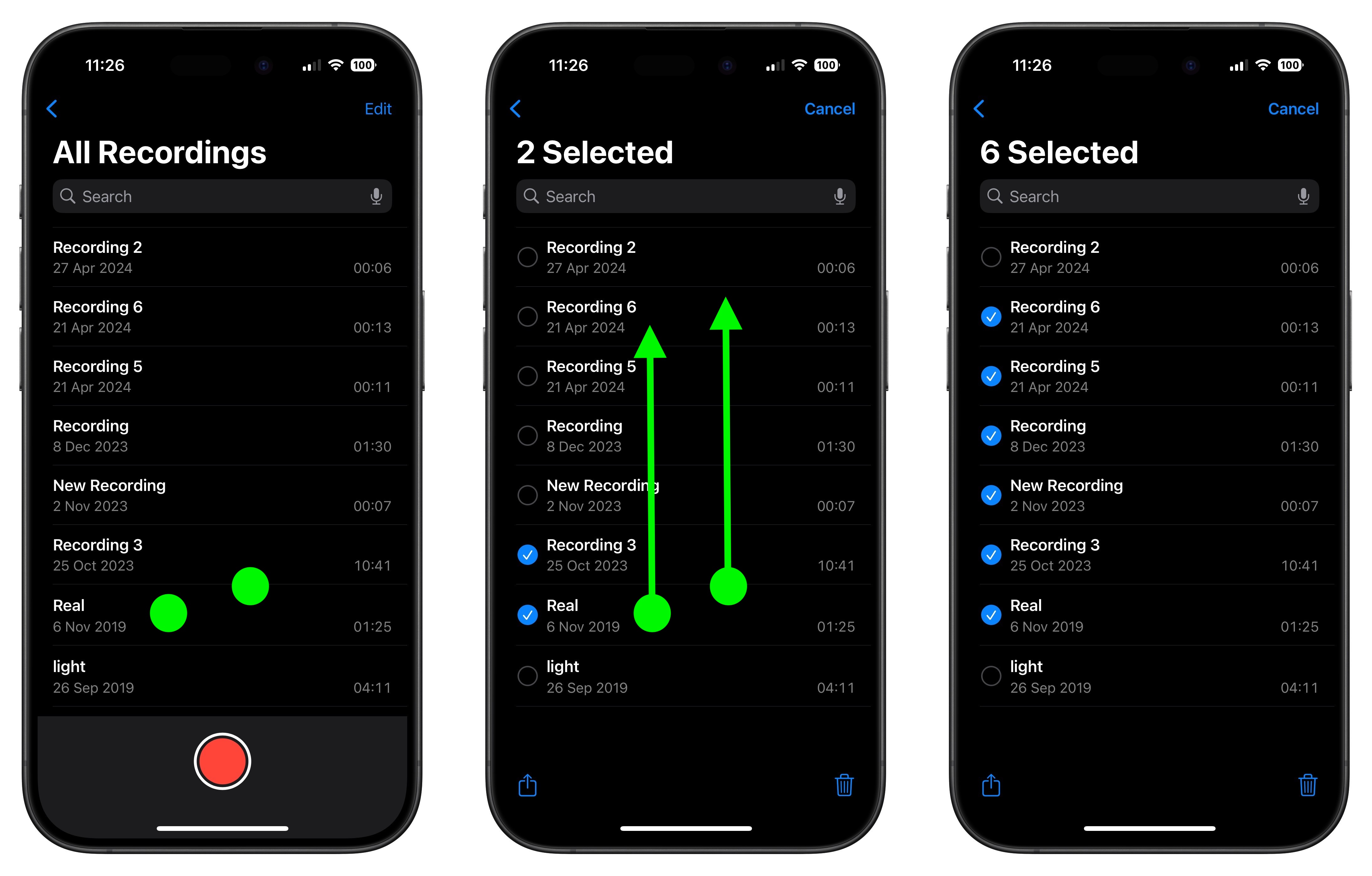
Boost Your Productivity with This Simple Trick
This seemingly small gesture can have a big impact on your productivity. Imagine quickly selecting dozens of emails for archiving or deleting, or effortlessly moving multiple voice memos into a new folder. The two-finger drag eliminates the tedium of individual item selection, saving you valuable time and effort.
This gesture is especially helpful when dealing with long lists of items. Instead of scrolling through and tapping each one individually, you can swiftly select multiple items in just a few seconds.
Beyond Apple's own apps, many third-party apps also support this two-finger drag gesture. Experiment with your favorite apps to see where you can implement this time-saving trick.
Looking for More iPhone Tips and Tricks?
If you enjoyed this tip and want to learn more ways to optimize your iPhone experience, be sure to check out our other helpful guides. For example, you can significantly speed up your text editing skills with this favorite hidden trackpad trick.
This article, "Select Faster on iPhone With This Two-Finger Trick" first appeared on MacRumors.com
Discuss this article in our forums
from MacRumors
-via DynaSage

Post a Comment